Built by a builder, for builders and service trades
For service companies and their technicians

Your whole construction company.
One system. Flat pricing.
Your service company.
One system. Flat pricing.

Bids, schedules, crews, invoices and the books, all in one place. For home builders, remodelers and trades like framing, drywall, solar and HVAC.

Service calls, a dispatch board, the job map and your technicians' phones, in the standard account for garage doors, HVAC, plumbing, electrical and every trade that sends technicians out, set up with you.

$299/month per company Unlimited users See the service account ↓

$299/month per company Unlimited users See what's included ↓

Demo: the real product, running a made-up builder. No sign-up, nothing to install.
Start: 30 days free, then $299 a month per company plus any sales tax. A card is needed to start; stop any time before day 31 and you pay nothing. Talk to us first

Dispatch demo: an example service company's day, every call on the board and the map. No sign-up.
Start: Opens a short form. Nothing is paid here; a person sets up your company, usually within one business day.
SelfConstruct office dashboard for a made-up builder: money in and out this week, what is owed to you, and what needs attention across the jobs
SelfConstruct Gantt schedule: phase bars for each job with percent complete and late phases flagged
The client portal for one job: where the project stands, the expected completion date and the decisions waiting on the client
JobFi, SelfConstruct's built-in accounting: checking, receivables, payables and net income, and a Profit and Loss statement run from the ledger
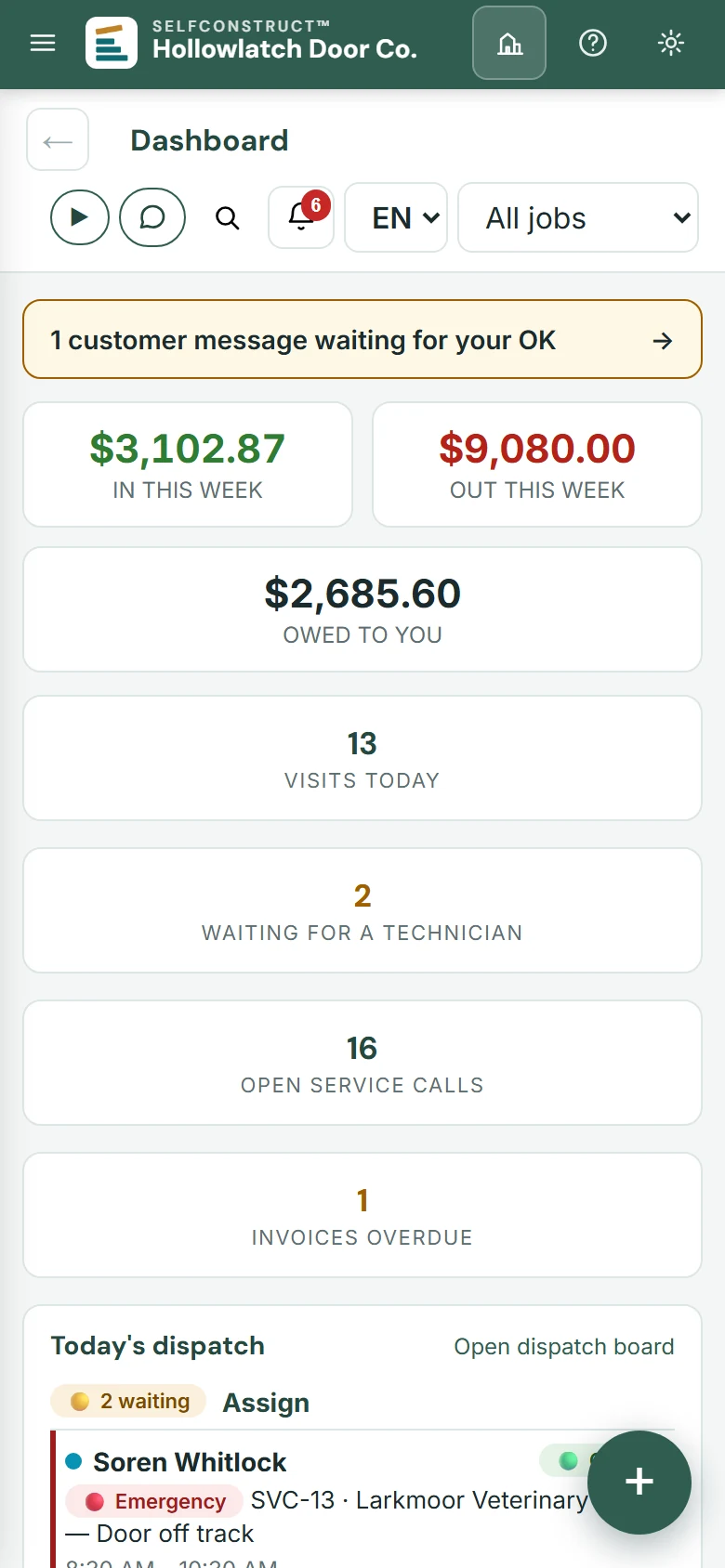
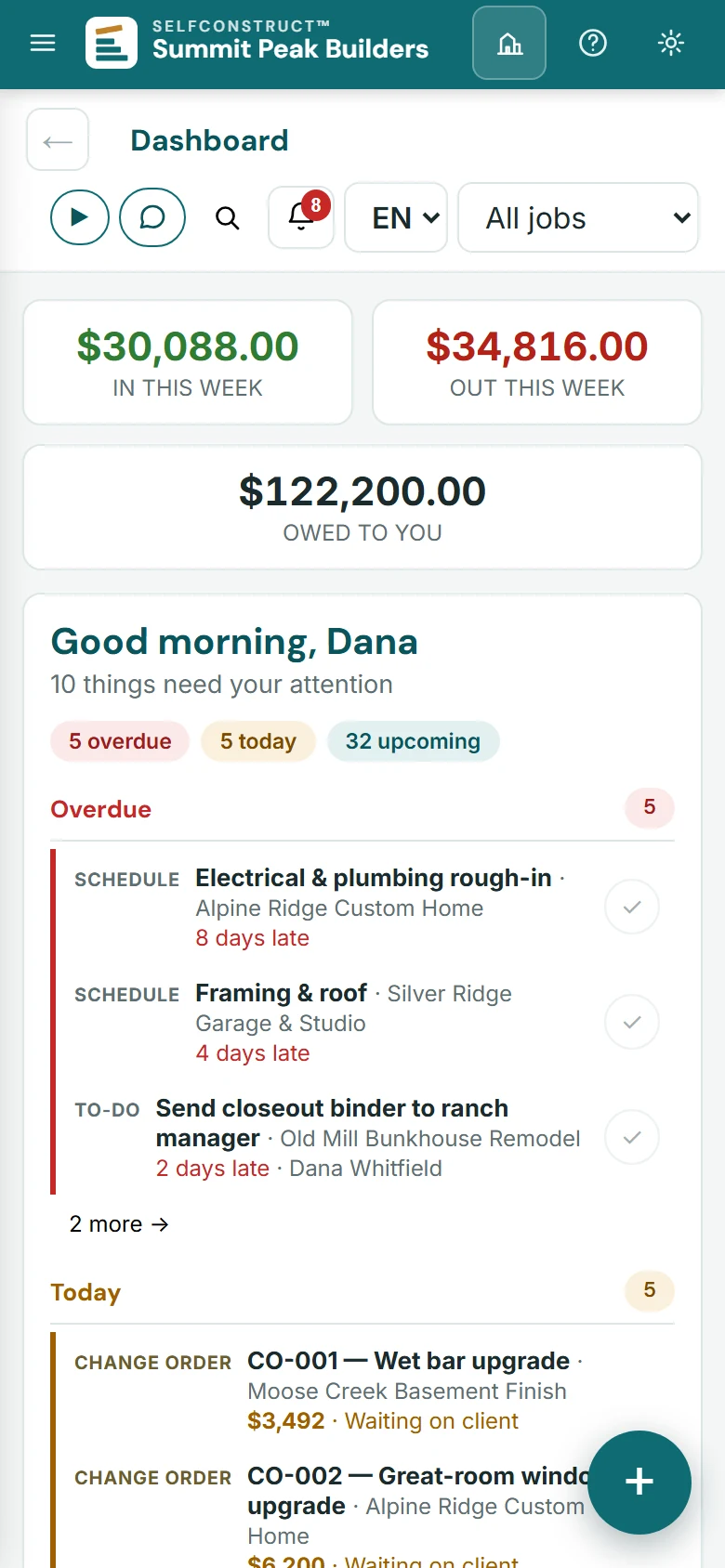
SelfConstruct office dashboard on a phone: money in and out this week, what is owed to you, and the overdue and today's items
SelfConstruct dispatch board: unassigned service calls waiting on the left, and each technician's day as a lane of visits marked done, on site, on the way or booked
Today's service calls on a map, each pin in its technician's colour and marked scheduled, on the way, on site or done - 15 of 15 calls on the map
SelfConstruct Home for a made-up garage-door company: visits today, calls waiting for a technician, open service calls, and each technician's status and next call
SelfConstruct Home for a made-up garage-door company on a phone: money in and out this week, what is owed, visits today and the calls waiting for a technician

Real screens from the live demo: the real product running a fictional builder. The names, people, jobs and prices in it are illustrative.

Real screens from the live demo: Hollowlatch Door Co., the demo's example service company, a fictional garage-door company. The names, people, jobs and prices in it are illustrative. Map data © OpenStreetMap contributors.

How it works

Here's your day in SelfConstruct

One system, 4 portals: the office, the crew, the client and the subs, each on the phone they already carry.

From the first call of the morning to the last visit of the day: the office fills the board, and each technician works from their phone. These tools are part of the standard account for every trade that sends technicians out; here they run on the demo's example company, a fictional garage-door company.

  1. SelfConstruct office dashboard on a phone: money in and out this week, what is owed to you, and the overdue and today's items
    In the office

    See the whole company

    What came in, what went out, what you are owed and what is late today, across every job.

    Open the office live →
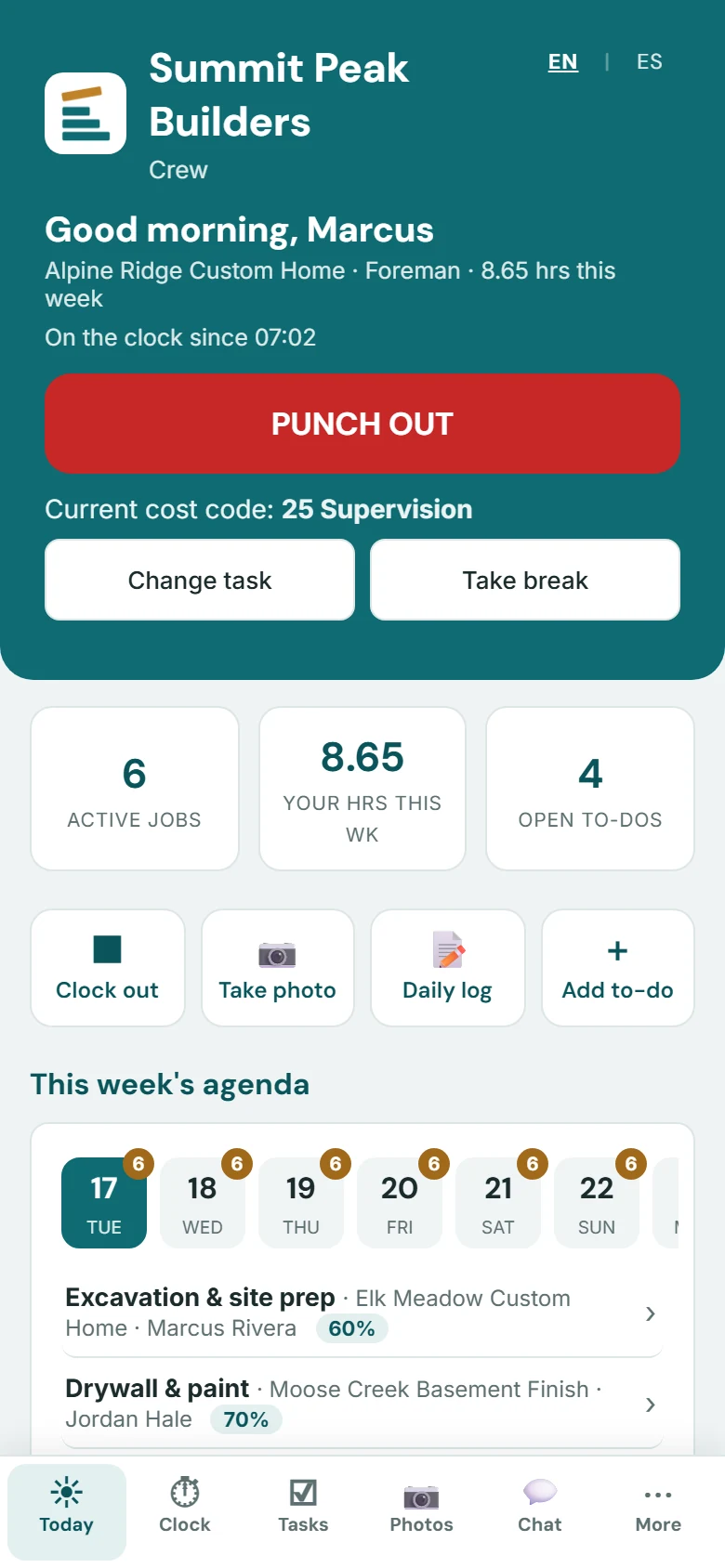
  2. SelfConstruct crew app on a phone: clocked in with a Punch Out button, cost code, clock, photo and daily-log shortcuts, and this week's agenda
    On site

    Crews clock in

    From their own phone: the time clock, today's schedule, the daily log and photos. Hours land on the right job.

    Open the crew app live →
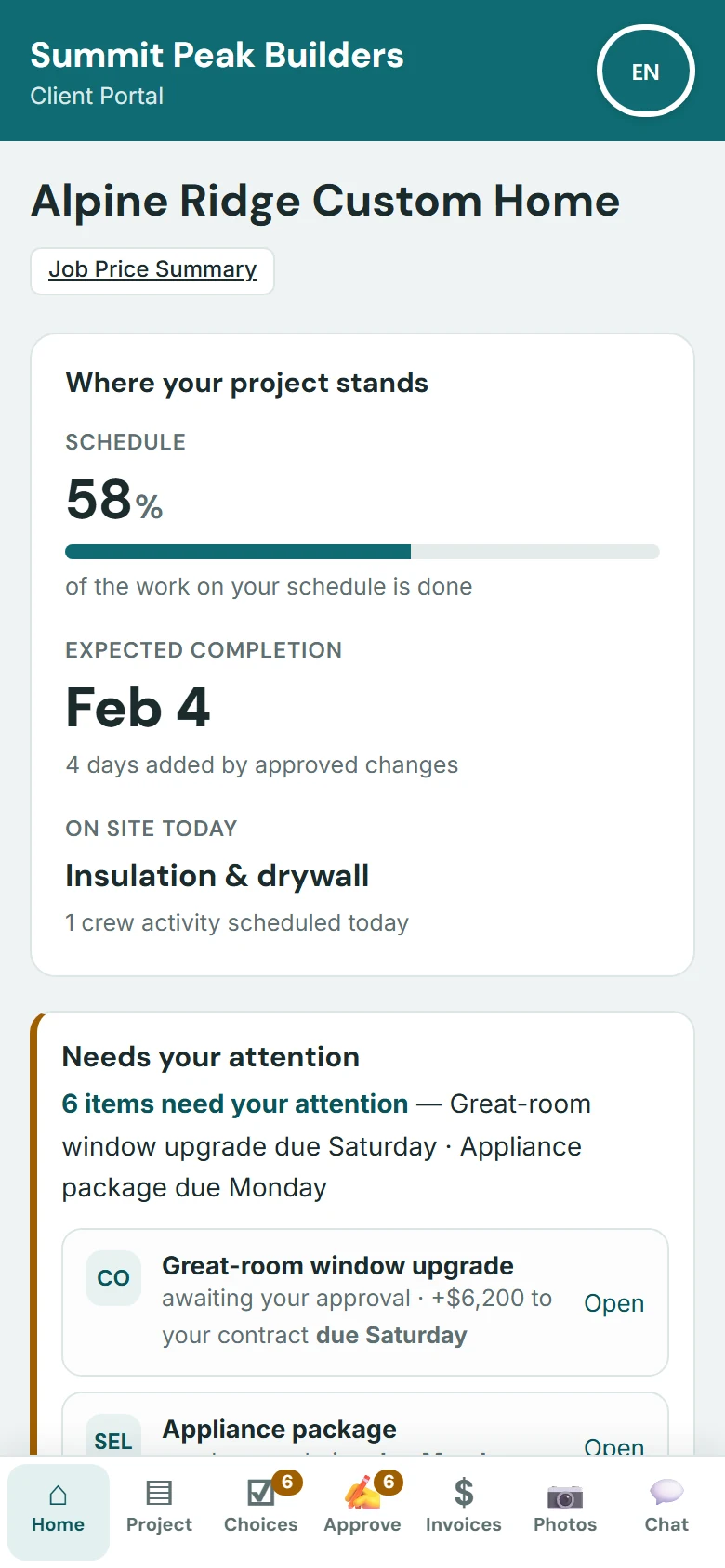
  3. SelfConstruct client portal on a phone: where the job stands, the expected completion date and the decisions waiting on the homeowner, with tabs for choices, approvals, invoices, photos and chat
    With the client

    Clients follow the build

    Progress photos, milestones, selections, change orders to approve and draw invoices from the schedule of values. No login to create, just a job code.

    Open a client portal live →
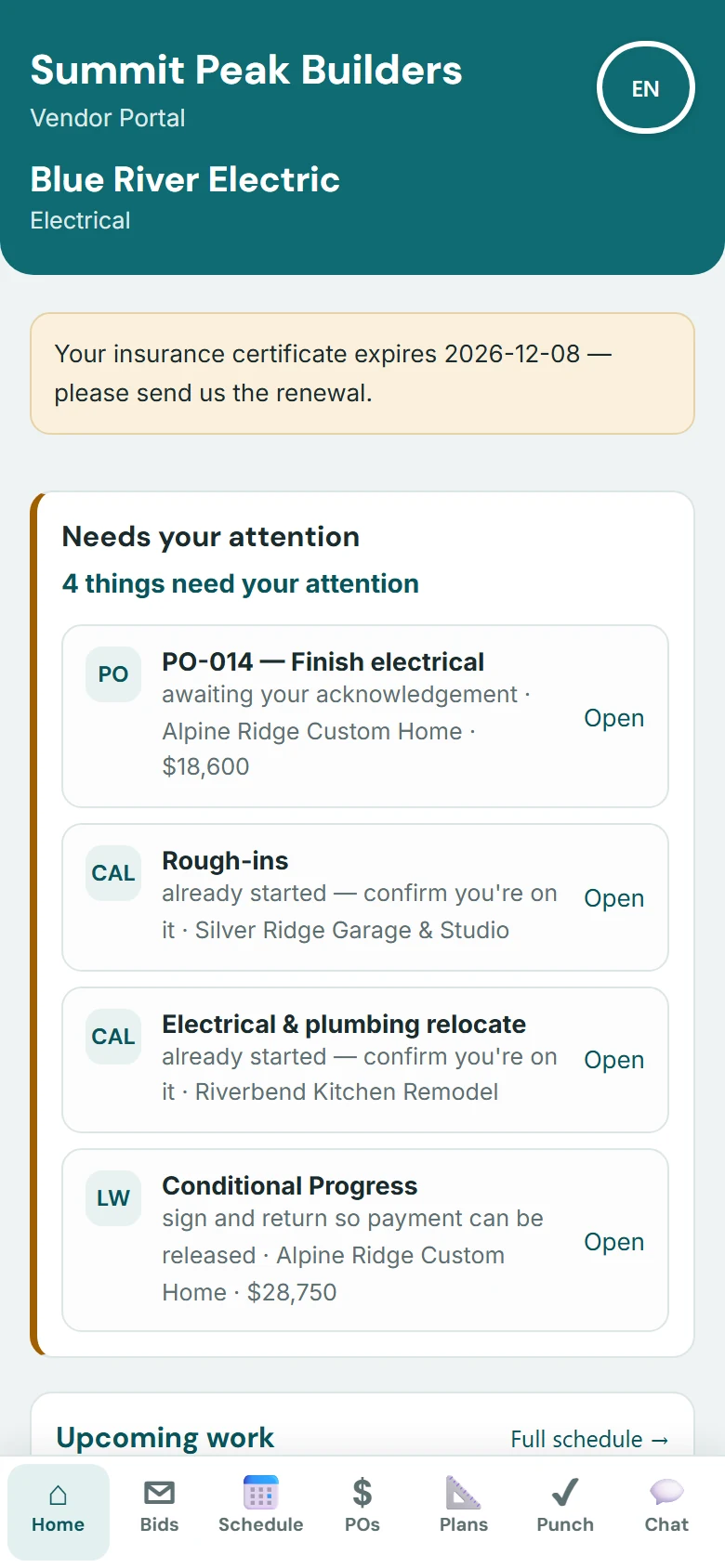
  4. SelfConstruct sub and vendor portal on a phone: an insurance-expiry notice and a list of purchase orders and schedule items needing attention
    With your subs

    Subs see their POs

    Purchase orders, bid requests, plan sheets and where their payment stands, with insurance certificates tracked on your side.

    Open the sub portal live →
  1. SelfConstruct Home for a made-up garage-door company on a phone: money in and out this week, what is owed, visits today and the calls waiting for a technician
    In the office

    Fill the board

    Calls waiting for a technician, today's visits and every technician's status, on the office's Home and the dispatch board.

    Open the dispatch board live →
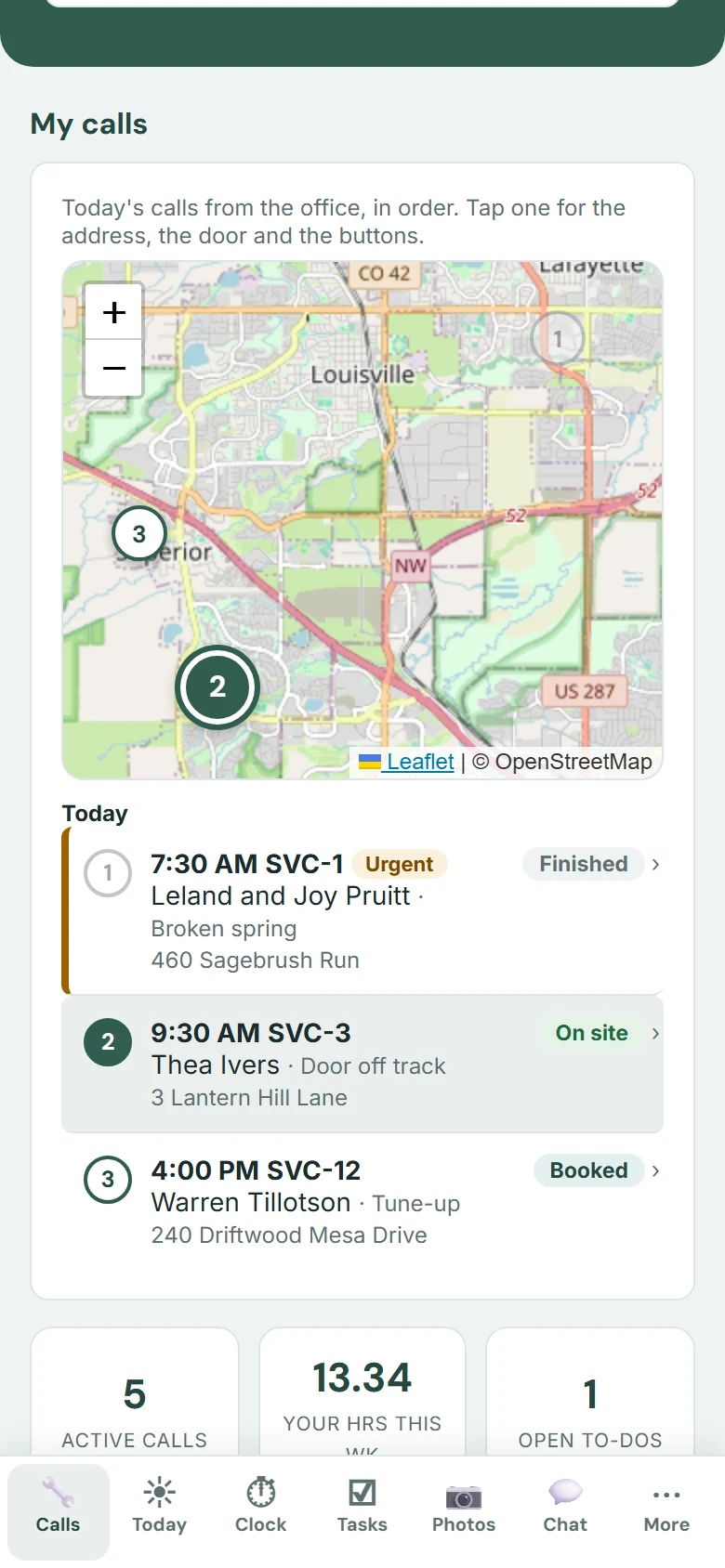
  2. A technician's phone: today's calls from the office in order, on a map and in a list, each marked finished, on site or booked
    On the road

    My calls, in order

    Each technician sees today's calls from the office, in order and on a map, with the address and a Directions button.

    Open a technician's phone live →
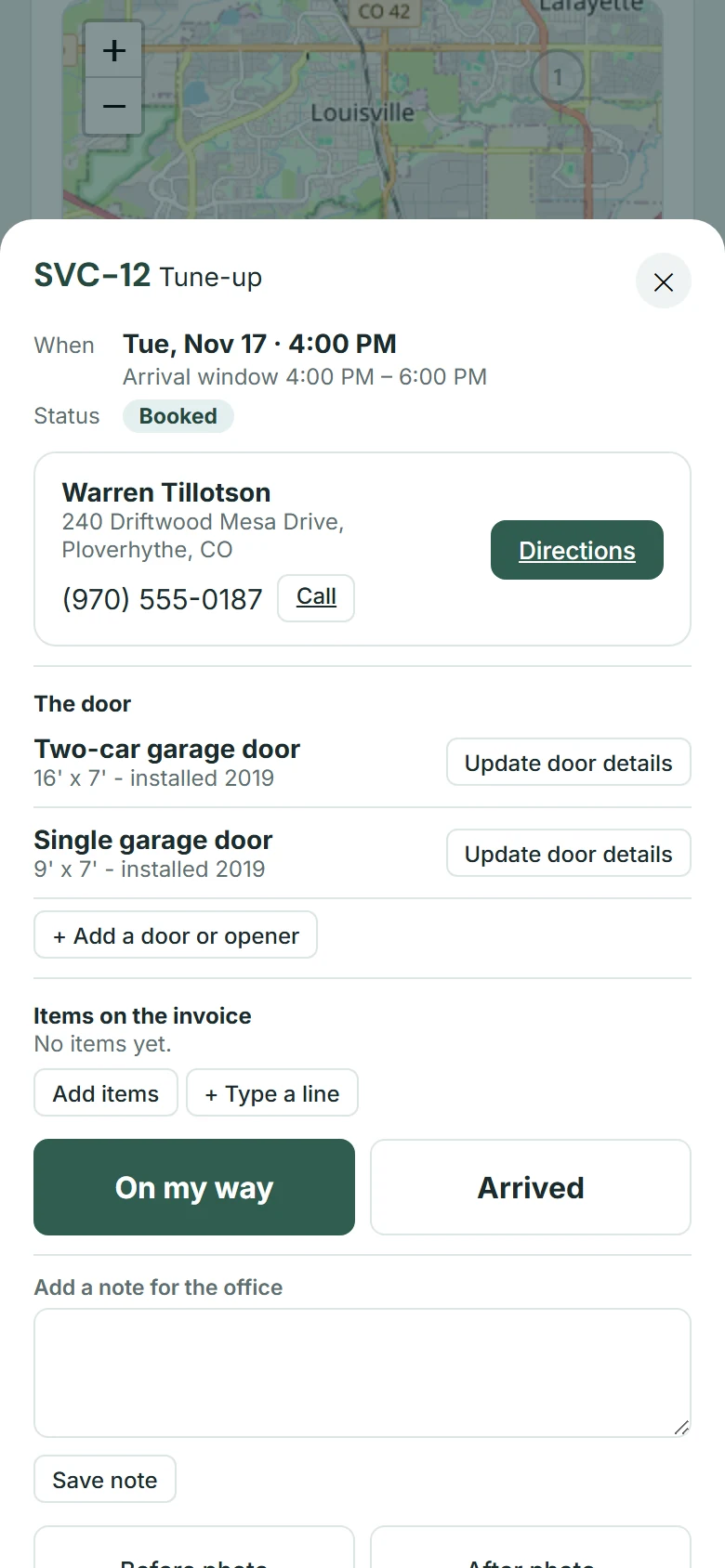
  3. A visit on the technician's phone with the On my way and Arrived buttons, the customer's address, Directions and Call
    At the door

    On my way. Arrived.

    One tap each tells the office, and the customer can get an email when the technician heads out.

    Tap On my way on the phone live →
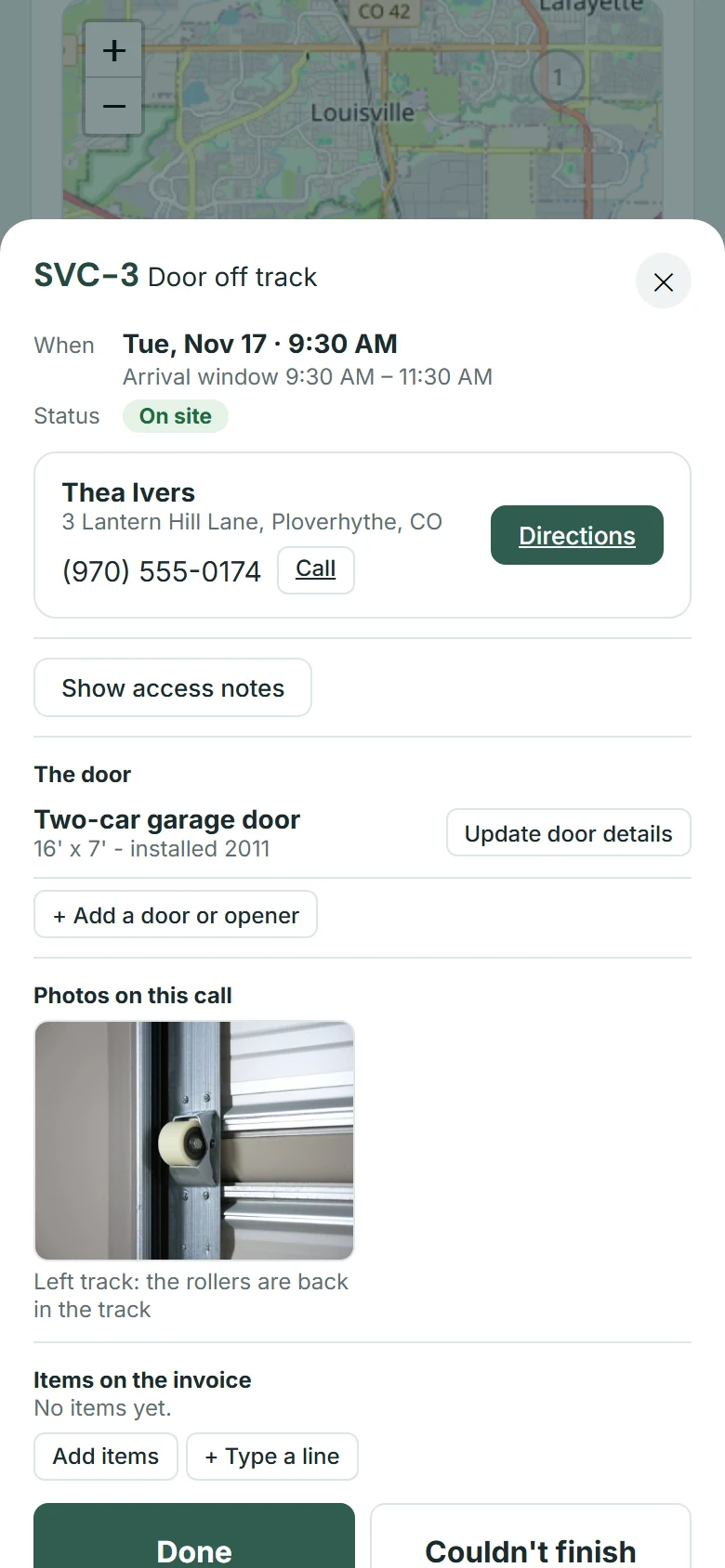
  4. The visit a technician is on: the door on file and the Done and Couldn't finish buttons
    On site

    Done, or couldn't finish

    The equipment on file, a note for the office, before and after photos, and a clear close to the visit.

    Finish a call on the phone live →
An appointment confirmation email from a made-up garage-door company: the arrival window, the address, the technician and the call's reference
Your customer hears from you

Emails in your company's name

When a visit is booked, when the technician heads out and when an invoice is ready, in English or Spanish.Shown as Service settings shows the email before it is sent, with a made-up company's name. Showing it sends nothing.

Pricing classes with a target and a minimum margin each, and the markup each one equals
For service companies: prices that keep their margin

A price book with margin floors

Pricing classes each have a target and a minimum margin, a quote or invoice with a line below its minimum can be held until an Owner approves it, and technicians add items from the price book on the visit. It is part of every service company's standard account, and so is sales tax by line, worked out from the rates in your own settings and set up with you for your state, with your books in JobFi™.This picture was taken on a test copy of SelfConstruct with the garage-door starting values loaded, not on the live demo. The demo's garage-door company is built with the same pricing classes and with sales tax by line turned on.

Real screens from the live demo. The names, people, jobs and prices in it are illustrative.

Hollowlatch Door Co., the demo's example service company, is a fictional garage-door company. The names, people, jobs and prices in it are illustrative.

Find your trade

See it in your line of work

Pick your trade to read about the demo company closest to your kind of work.

View all 47 tradesShow fewer trades

The names, people, jobs and prices in this demo are illustrative.

Find your trade

See it in your line of work

Every trade that sends technicians out gets the standard account, set up with you. Garage doors first: Hollowlatch Door Co., a fictional garage-door company, is the demo's example company and runs the dispatch demo. Pick your trade: each one has its own demo company, with its own service calls.

View all 20 service tradesShow fewer trades

The names, people, jobs and prices in this demo are illustrative.

No surprises

What you can count on

Everybody's included

Unlimited users: office, crews, subs and clients. Adding a person never costs more; the plan limits storage, not people.

Your own private system

Your company runs on its own database, never shared with anyone else's. Backups are encrypted and kept offsite, and two-step sign-in is available on office logins.

English & Spanish

The office and the client, crew and sub portals. Each person picks their own language on their own device.

Works on any phone

Installs to the home screen like an app. Nothing to download from an app store.

Your data stays yours

Full company export — database, files and CSVs — any time

Month to month

No annual contract required and no exit fee. If you leave, your database and files go with you.

Why builders switch: all six differences, each linked to the demo screen that proves it →

Set up with you

Every trade that sends technicians out starts with a short form: nothing is paid on this page, and a person sets up your company with you.

Your own private system

Your company runs on its own database, never shared with anyone else's. Backups are encrypted and kept offsite, and two-step sign-in is available on office logins.

English & Spanish

The office and each technician's phone, each person in their own language on their own device. Customer emails go out in English or Spanish.

Any phone, even with no signal

Installs to the home screen like an app. A technician's phone keeps today's and tomorrow's calls, and what they tap with no signal reaches the office when the signal is back.

Your costs stay in the office

A technician's phone shows the price book's items at the customer's class price, never your cost or margin.

Your data stays yours

Full company export — database, files and CSVs — any time

Service calls, step by step, from the call to the invoice →

The daily work

Everything between the handshake
and the final draw

One system from the first call to the last invoice, so a number entered once lands everywhere it should.

Sales & Bids

Bids that read like you walked the site

A kanban pipeline from first call to signed contract, and a bid builder that sends your client a proposal under your logo, in your colors. They read it on their phone, tick the options they want and sign it online. The cost and margin behind every section stay with you.

  • Leads pipeline with follow-up nudges, lead map & email campaigns
  • Cost, markup and margin on every section, kept in the office and never on the client's page
  • Client signs online; press Create Project and the signed bid becomes the job, its budget, schedule of values and deposit invoice

Every bid can carry

  • Priced scope sections
  • Allowances
  • Alternates the client can tick
  • Phase schedule
  • Inclusions & exclusions
  • Terms
  • Deposit at signing
  • Online signature
Opens in your logo & colorsThe top of a proposal from Quillback Ridge Builders, a fictional builder, as its client opens it: the builder's logo in a white box on a band of the builder's plum, the title Antler Bench custom home - 4,200 sf, prepared for Marguerite Vail at Lot 9, Antler Bench, and the proposal number and dates. On a wide screen it also links to each section of the proposal; on a phone a bar at the bottom holds the $1,318,100 contract price and a Review & sign button.

Your logo leads, on a band of your color. SelfConstruct appears only as a small credit at the foot of the page.

Shown: Quillback Ridge Builders, a fictional builder made up for these pictures.

They tick an option, the total updatesThe Alternates section of the same proposal: a heated driveway and front walk at $24,800 included in the contract price, a 12 kW rooftop solar array ticked to add $41,500, a covered rear deck at $36,200 left unticked, and the total moving from a $1,276,600 base contract to $1,318,100

Each alternate shows its price. Ticking one re-prices the contract on the page (here $1,276,600 becomes $1,318,100), and the choice is recorded when they sign.

Signed online, in their own handThe same proposal after signing: Accepted, signed by Marguerite Vail with the date and time, her drawn signature, and a line saying a copy of the signed proposal stays available at the link

Consent, a one-time code, a typed name and a drawn signature. The signed version is locked as the contract.

See the office side of the same bid: cost and margin, the contract, the deposit (pictures 4 to 6)
In your office

Your numbers stay in the office, and the signed bid becomes the job

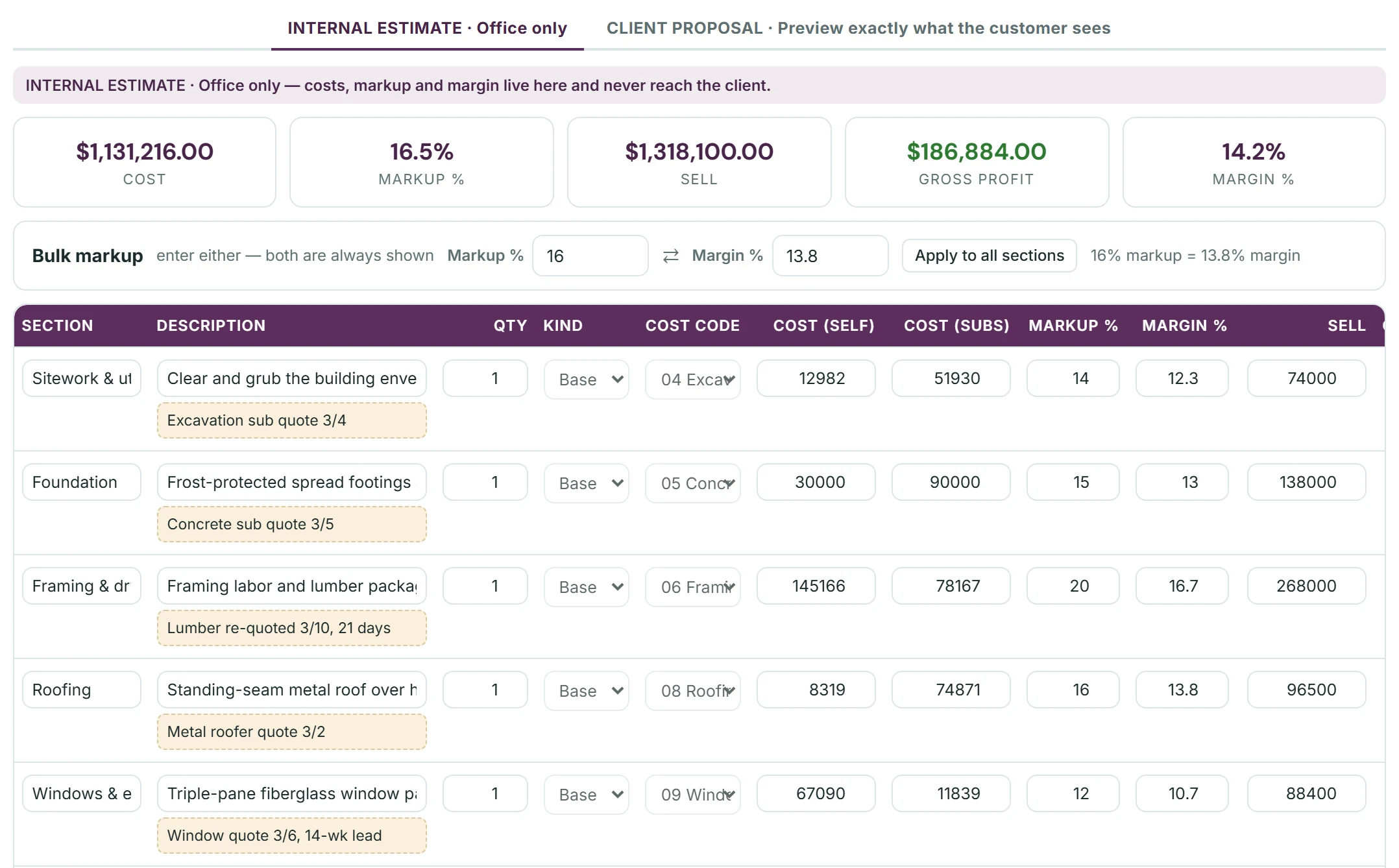
Cost, markup & margin — office only
The same bid's internal estimate in the bid builder, marked office only: costs, markup and margin live here and never reach the client. The totals: cost $1,131,216.00, markup 16.5%, sell $1,318,100.00, gross profit $186,884.00 and margin 14.2%, and a bulk markup box where 16% markup is 13.8% margin. On a wide screen, the first five sections - sitework and utilities, foundation, framing and dry-in, roofing, windows and exterior doors - each with its description, its internal note, its kind, cost code, own cost and subcontract cost, and its own markup and margin.

The numbers stay in the office. Under the bid's totals, every section carries its cost code, its own and subcontract cost, and its own markup and margin.The whole bid's cost, markup, sell, gross profit and margin, and a bulk markup you can enter as either markup or margin. The sections become the job's budget, with the original estimate pinned to track against actual. Your costs, markup and margin never reach the client.

Create Project builds the jobIn the SelfConstruct office, the same bid after signing: Proposal Accepted, a $1,318,100 contract signed by Marguerite Vail, v1 is the contract and immutable, and Create Project from Accepted Proposal, listing what it will make: the customer and the project, the contract amount, the original estimate pinned at cost $1,131,216, gross profit $186,884 and margin 14.2%, a job budget and schedule of values of 16 cost-coded lines, the three allowances as selections, the selected alternates, 3 files from the lead and a $131,810 deposit invoice visible in the client portal. On a wide screen it also shows the Custom Home full-sequence job template picked, beside the Create Project button.

Locked as the contract. The signed v1 can't be edited; a change becomes a new version, or a change order once the job exists. Create Project opens the job with its budget and schedule of values of 16 cost-coded lines, the client's selections, the lead's files and the deposit invoice.

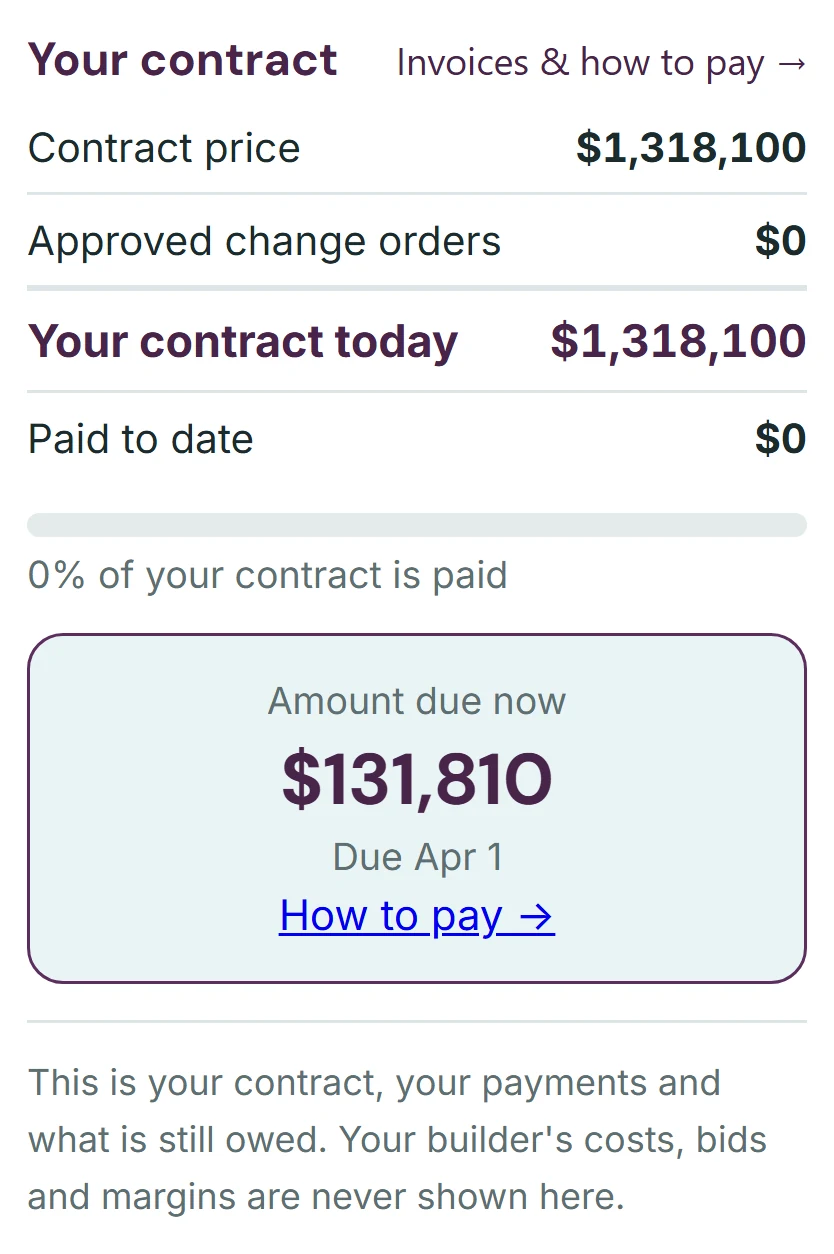
The deposit, already in their portalThe contract card in the client's portal for the same job: contract price $1,318,100, no approved change orders, nothing paid yet, $131,810 due now with its due date and a How to pay link, and a line saying the builder's costs, bids and margins are never shown there

In their portal, in your color. The contract card already shows the $131,810 deposit due now, with how to pay it, and tells the client that your costs, bids and margins are never shown there.

Project management

Schedules that survive contact with reality

Gantt and calendar views with dependencies and a baseline kept honest. Daily logs, to-dos, change orders, selections, RFIs, submittals and warranty, tracked where the crew already is.

Scheduling →
Money, all of it

From takeoff to trial balance, no exports

Budgets, POs, vendor bills and draw invoices from the schedule of values, with payments tracked to the cent. P&L, balance sheet, cash flow, WIP and job costing: 24 reports built in.

Invoicing & job costing →
Accounting, built in

JobFi™, the books inside the job

A double-entry general ledger with a builder's chart of accounts, bank statements you import and reconcile, and an accountant package at tax time. It does not run payroll or file sales tax, and an independent construction-CPA review is planned, not finished.

JobFi™ accounting →
Service & dispatch

Service calls, the board and the map

For every trade that sends technicians out, in the standard account and set up with you: calls with the equipment on file, a dispatch board, the job map, the technician's phone, customer emails, a price book with margin floors, and sales tax by line for your state, with your books in JobFi.

Service calls →
Plan Studio

Draw the job in 2D and 3D

Draw floor plans in 2D and see them in 3D, without a drafting seat to buy.

Plan Studio →
The AI office

Paperwork in, decisions out

Hand it a plan set, a county letter or a bid. It reads your documents, checks your own cost history and drafts the reply, with the code sections cited for you to verify. A bid check runs about $0.18, and $25/month of AI use is included.

The AI office and its allowance →
The daily work

Everything between the phone call
and the invoice

Part of the standard account for every trade that sends technicians out: the call, the board, the technician's phone and the invoice in one system, shown here on the demo's example company, a garage-door company.

Service calls

Take the call on one screen

A new service call is one form: the caller by phone, name or email, the property, the equipment, the issue, the priority, and the day and part of the day they asked for. When you save, the call gets its own number and says what it already knows: an open call at that property, or the same equipment back within the callback period you set.

  • Each address is a property, with its customer, a site contact, access notes and the equipment on file: what it is, its make and its model, and for a garage door its size, the year it went in and its springs
  • A property keeps its history of calls, visits, technicians and invoice totals, so the next call there starts from what you already know
  • The list of calls filters by status, priority, the day it was opened and technician, so nothing waiting gets lost
Service calls →

Every call can carry

  • The caller, if not the customer
  • Who authorized the work
  • Access notes
  • The equipment on site
  • Priority
  • The day and part of the day asked for
  • Notes and before-and-after photos
  • Every tap, on its timeline
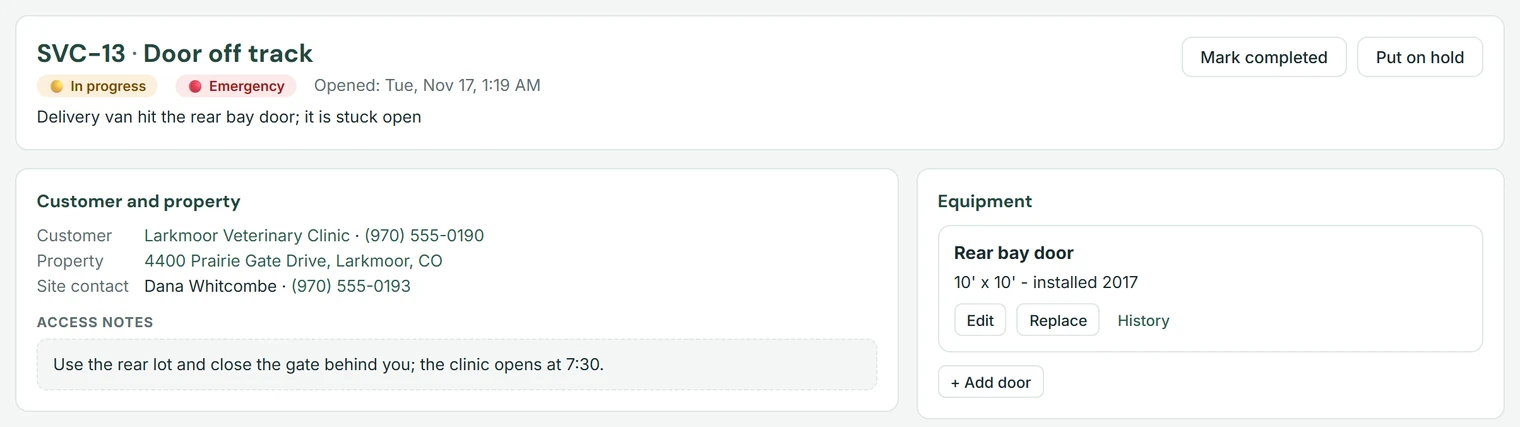
One call in the demo: SVC-13, a door off trackService call SVC-13 of Hollowlatch Door Co., the demo's fictional garage-door company: door off track, in progress, an emergency - a delivery van hit the rear bay door and it is stuck open. Below it, the customer, a veterinary clinic, with the property's address, its site contact and access notes, and the equipment on file: the rear bay door, 10' x 10', installed 2017

One call, opened from the list. The customer and the property, the site contact and the access notes, and the door on file with its size and the year it went in. Hollowlatch Door Co. is the demo's fictional garage-door company; the names in it are illustrative.

Dispatch board

The board, and the day's calls on the map

The dispatch board opens on today: the calls waiting for a technician on the left, emergencies first, and each technician's day as a lane. Drag a call onto a lane, or a visit to another technician or another time, and before anything is booked the board shows what the move runs into.

  • On a phone, the same move as a form: technician, day, time, duration and arrival window
  • Two dispatchers, one board: it checks for changes every 25 seconds and says so when someone else moved a visit first
  • Under the board, each call of the day is a pin at its property, in its technician's color
The dispatch board →
Today's calls on the mapToday's service calls on a map, each pin in its technician's colour and marked scheduled, on the way, on site or done - 15 of 15 calls on the map

A real screen from the live demo. Map data © OpenStreetMap contributors.

The technician's phone

My calls, and a clear close to every visit

Each technician sees today's calls in order, with Directions, the customer's number and the equipment on file. On my way, Arrived, Done and Couldn't finish each change the visit on the board, and notes, before-and-after photos and the equipment's details go in from the spot.

Open a technician's phone live →
No signal

Taps wait for the signal

The phone keeps today's and tomorrow's own calls. What a technician taps with no signal (On my way, Arrived, Done, notes and photos) waits on the phone and goes to the office when the signal is back, never twice. The map needs a connection; the list of calls does not.

The price book

Prices that keep their margin

The price book puts each customer in a pricing class, such as residential retail or commercial, each with a target and a minimum margin. A quote or invoice with a line below its class minimum can be held until an Owner approves it, and the approval is recorded.

Service calls and the price book →
Invoices

Bill from the call

The invoice email takes your customer to their own invoice page, and you record the payment when it comes in. Items from the price book go on the call's invoice, and sales tax is worked out by line from the rates in your own settings when it is sent, set up with you for your state.

Your customers

Emails in your company's name

Your customers can get emails in English or Spanish when a visit is booked, when the technician heads out and when an invoice is ready, and each one can be switched off in Service settings. Card and bank payments are not available yet.

Works today

Quotes, jobs, invoices and the books

Quotes, jobs, invoices, the payments you record and JobFi, the built-in books, work for every trade today. Service agreements and truck stock are not available yet.

Pricing

One price per company. Every module included. Unlimited users.

No per-seat math and no tiers to decode. $299 a month per company runs the whole system for everyone in it.

Run a service company that dispatches technicians, such as garage doors, HVAC, plumbing or electrical? Service calls, the dispatch board and the technicians' phones are part of this same account, set up with you: start with the short form.

Need more in a busy month? Optional add-ons — AI credit packs from $19, bought in the app (AI Office → AI Usage), any time. Extra onboarding help is set up with you on your walkthrough. None of it is required.

One plan, month to month by default — or pay annually and get 2 months free. Annual is a choice, never a requirement; no onboarding fee, no per-seat surprises.
The price on this page is for one company, and it does not change when you add people. It includes 50 GB of files and records; beyond that, storage is $10 per extra 10 GB a month. Each additional company you run is another $299 a month, on its own private instance with its own books. Prices are in US dollars, before any sales tax that applies.

Pricing

The service account, set up with you

Every trade that sends technicians out gets the standard account at the standard price, $299 a month per company, before sales tax, with its service calls, dispatch board and technicians' phones in it. It starts with a short form: nothing is paid on this page, and a person sets up your company with you.

Every service trade's account includes service calls, the dispatch board, equipment at customer properties, a price book with margin floors, and sales tax by line set up with you for your state, with your books in JobFi. Each trade's page shows its own card, with what is not available yet for that trade: find your trade.

One plan, month to month by default — or pay annually and get 2 months free. Annual is a choice, never a requirement; no onboarding fee, no per-seat surprises.
The price is for one company, and it does not change when you add people. It includes 50 GB of files and records; beyond that, storage is $10 per extra 10 GB a month. Each additional company you run is another $299 a month, on its own private instance with its own books. Prices are in US dollars, before any sales tax that applies.

Questions

Asked and answered

How long does setup take?
About a day. We provision your private instance and put your logo on it; the in-app Setup Center then takes you through your company details, your books and your team yourself — nothing you have to wait on us for. A live walkthrough for your team is there if you want one. The in-app Training Academy — short narrated walkthroughs on demo data — handles every new hire after that.
I already have years of data somewhere else — what comes across?
Your customer list, vendors, jobs, leads, schedule items, to-dos, open invoices, purchase orders and unpaid bills import from Excel or CSV files you export yourself, and your opening balances are set on a cutover date you pick. Your general ledger history stays in your old books; documents, photos, estimates and time history start here. Nothing is written until you approve the preview, and a reconciliation report afterwards sets the two systems side by side line by line. The page on moving over says exactly what does and does not come across.
Do I still need separate accounting software?
Not for the books. SelfConstruct includes a full double-entry general ledger: chart of accounts, bank import, reconciliation, P&L, balance sheet, cash flow, trial balance, and an accountant package for tax time. Your CPA gets real financial statements backed by a double-entry ledger — plus clean exports when they need them. It does not run payroll and does not file sales or use tax, and it has not yet been reviewed by an independent construction CPA. The accountants' page states the limits in full.
Is SelfConstruct in Spanish?
Yes. The office and the client, crew and sub portals are in English and Spanish, and each person picks their language on their own device, so a crew lead can clock in in Spanish while the office works in English. This website has a Spanish version too.
Does it work for a service company that dispatches technicians?
Yes. For every trade that sends technicians out (garage doors, HVAC, plumbing, electrical and more), it is the standard account at the same price, set up with you: service calls with the equipment on file, a dispatch board and the job map, the technician's phone app (My calls, On my way, Arrived, Done), customer emails for bookings, technicians heading out and invoices, a price book with margin floors, and sales tax by line set up for your state, with your books in SelfConstruct. The dispatch demo shows them on a made-up garage-door company's day. Quotes, jobs, invoices, the payments you record and the built-in books work for every trade today.
Is it really unlimited users?
Yes. Office logins, crew codes, sub codes, and client portals are all included in the one price, $299 a month per company. We price per company because that's how a construction company actually works — the last thing you need is a toll booth on adding your framer. What the plan limits is storage, not people: 50 GB of files and records per company is included, and beyond that it is $10 a month for each extra 10 GB.
Who can see my data?
Your company runs in its own isolated instance with its own database — there is no shared multi-tenant store. Your clients see only their job through their portal code; crews and subs see only what you grant. Offsite backups are sealed with public-key encryption, and two-step sign-in (two-factor authentication) is available on office logins. The full plain-language rundown is on our security page.
What happens if I cancel?
You get your complete database and uploaded files handed to you, and we delete the instance. Month to month, no annual contract, no exit fee. Your history is yours.
Is there a mobile app?
SelfConstruct installs to any phone's home screen like an app — the office, crew, client and sub portals all work full-screen on iOS and Android. The office and crew apps can send push notifications; clients and subs get email. Nothing to download from an app store, nothing to update.
What does the AI actually cost me?
Your plan includes $25/month of AI usage. A typical bid-vs-cost-history check runs about $0.18; a drafted county-letter reply, around a dollar. Heavy months can add credit packs — spent after the allowance, good through the end of that month.
Questions

Questions service companies ask

Can my company start with it today?
Yes, if it sends technicians out: garage doors, HVAC, plumbing, electrical or another service trade. Service calls, the dispatch board and the technicians' phones are part of the standard account at the published price. Start with the short form: nothing is paid here, and a person sets up your company with you, usually within one business day.
Can I try it without signing up?
The live demo opens Hollowlatch Door Co., a fictional garage-door company, on its dispatch board, with no sign-up. Any call on the board opens from there.
How does the office know a technician is on the way?
The technician taps On my way on their phone. On my way, Arrived, Done and Couldn't finish each change the visit's status on the board and on the map, which show the change without a reload, and On my way can send the customer an email.
What happens when a technician has no signal?
The technician's phone keeps today's and tomorrow's own calls, with the equipment on file. What they tap with no signal (On my way, Arrived, Done, notes, before-and-after photos and the equipment's details) waits on the phone and goes to the office when the signal is back, never twice. The map needs a connection; the list of calls does not. An On my way that reaches the office more than ten minutes late sends the customer no email.
Can a technician see what a part cost me?
No. The phone shows a technician the price book's items at the customer's class price, never your cost or margin, and a line below its minimum margin waits for an Owner's approval before the invoice can go out.
Can customers pay by card from the email?
Not yet. Card and bank payments are not available. The invoice email takes the customer to their own invoice page, and you record the payment when it comes in.
Does it work for trades other than garage doors?
Yes. The demo shows a garage-door company, and every trade that sends technicians out gets the same standard account, set up with you: service calls, the dispatch board and the technicians' phones work the same way, and the equipment on file records what it is, its make and its model, instead of a door's size and springs. Every service trade's account has the price book with margin floors, and sales tax by line set up with you for your state, with your books in SelfConstruct; each trade's page says what is not available yet for that trade.
Is it in Spanish?
The office and each technician's phone are in English and Spanish, and each person picks their language on their own device, so a technician can work in Spanish while the office works in English. Customer emails go out in English or Spanish. This website has a Spanish version too.
Who can see my company's data?
Your company runs in its own isolated instance with its own database — there is no shared multi-tenant store. A technician's phone shows that technician's own calls, never your cost or margin. Offsite backups are sealed with public-key encryption, and two-step sign-in (two-factor authentication) is available on office logins. The full plain-language rundown is on our security page.
What does it cost?
For every trade that sends technicians out, the standard account at the published price: $299 a month per company, before sales tax, with unlimited users and 50 GB of storage included, and the service calls, the dispatch board and the technicians' phones part of it, set up with you. Nothing is paid on this page.
Still deciding?

Questions? Call or text us.

Call or text (720) 919-3396, or email hello@selfconstruct.app. If nobody picks up, we are on a site: leave a message with your name. Rather be shown around? Book a walkthrough.

Call or text (720) 919-3396, or email hello@selfconstruct.app. If nobody picks up, leave a message with your name and your trade.

30 days free, then $299 a month per company plus any sales tax. A card is needed to start; stop any time before day 31 and you pay nothing. Talk to us first

Opens a short form. Nothing is paid here; a person sets up your company, usually within one business day.

Book a walkthrough

Tell us where to reach you — we'll set up a 30-minute walkthrough, usually within one business day. No pressure, no contract talk unless you want it.

We only use this to reach you about your walkthrough.
Try the live demo → Start Dispatch demo → Start