Service call software that keeps the property and the equipment on file
For every trade that sends technicians out, in the standard account and set up with you: take the call on one screen, keep each property's equipment and history, send a technician with what they need, and bill from a price book with margin floors.
Dispatch demo: opens the service calls of Hollowlatch Door Co., a fictional garage-door company. No sign-up.
Start: Opens a short form. Nothing is paid here; a person sets up your company, usually within one business day.
Every service trade: garage doors, HVAC, plumbing, electrical and the other trades that send technicians out get the same standard account, set up with you. Nothing is paid here.
See a dispatcher's day · Software by trade
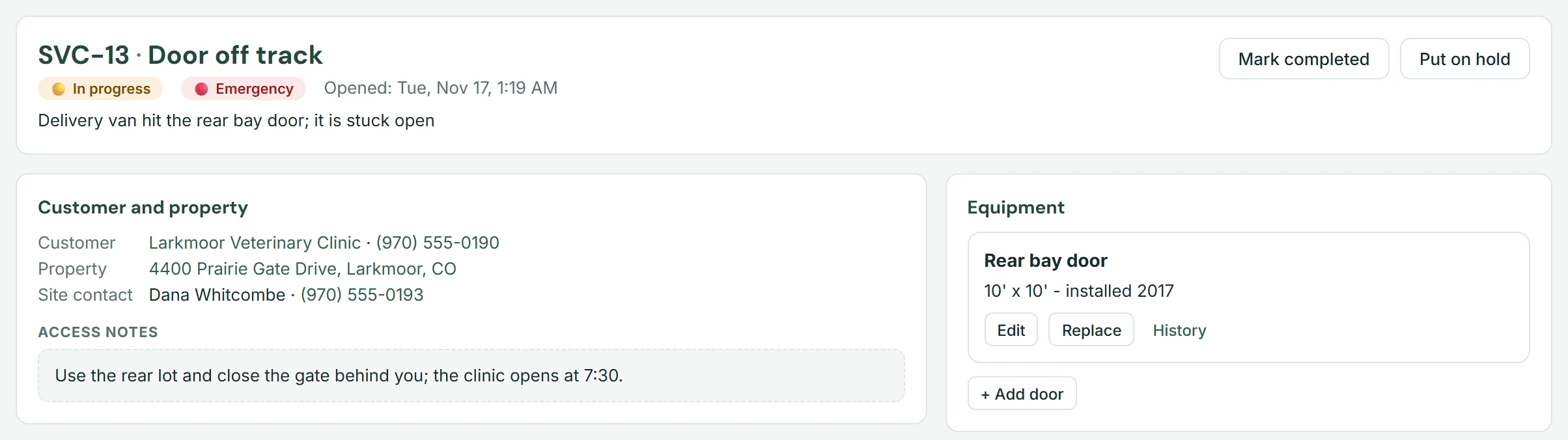
A real screen from the live demo: Hollowlatch Door Co., a fictional garage-door company. The names, people, jobs and prices in it are illustrative.
Take the call on one screen
A new service call is one form: the caller by phone, name or email, the property, the equipment, the issue, the priority, and the day and part of the day they asked for. The caller when it is not the customer, who authorized the work and the access notes go on the same screen. Save, or Save and schedule.
It tells you what it already knows
When you save, the call gets its own number - SVC-1, SVC-2 and on - and says what it found: an open call already at that property, or the same equipment back within the callback period you set. The list of calls filters by status, priority, the day it was opened and technician, so nothing waiting gets lost.
The property and the equipment on file
Each service address is a property, with its customer, a site contact and access notes, and the equipment there: what it is, its make and its model, and for a garage door its size, the year it went in and its springs. A property keeps its service history - calls, visits, technicians and invoice totals - so the next call there starts from what you already know.
Send a technician with what they need
Book the visit on the dispatch board with a technician, a day and an arrival window. On the technician's phone, My calls lists today's visits in order, each with Directions, the customer's number, the access notes behind their own button and the equipment on file.
On my way, Arrived, Done
One tap each: On my way, Arrived, Done or Couldn't finish. The office sees the status on the board and on the call, the technician leaves notes and before-and-after photos, and can update the equipment's details on the spot. Every tap lands on the call's timeline, with who made it.
A price book with margin floors
The price book puts each customer in a pricing class, such as residential retail or commercial, each with a target and a minimum margin. A quote or invoice with a line below its class minimum can be held until an Owner approves it, and the approval is recorded. Technicians add items on the visit at the customer's class price and never see your cost or margin.
Invoices and customer emails
Items from the price book go on the service call's invoice, and when it is sent, sales tax is worked out on each line from the rates in your own settings: sales tax by line, set up with you for your state, with your books in JobFi™. Your customers can get emails in your company's name, in English or Spanish, when a visit is booked, when the technician heads out and when an invoice is ready. Each email can be switched off in Service settings.
Where it stands today
For every trade that sends technicians out, service calls are part of the standard account at the published price, set up with you: you start with the short form, and nothing is paid on this site. The account also includes the price book with margin floors, and sales tax by line set up with you for your state, with your books in JobFi; the demo's example company, a garage-door company, shows both. Service agreements, truck stock and card or bank payments are not available yet. Quotes, jobs, invoices, the payments you record and the built-in books work for every trade today.
Questions service companies ask
Can a technician see what a part cost me?
No. The phone shows a technician the price book's items at the customer's class price, never your cost or margin, and a line below its minimum margin waits for an Owner's approval before the invoice can go out.
Does it work for trades other than garage doors?
Yes. The demo shows a garage-door company, and every trade that sends technicians out gets the same standard account, set up with you: service calls work the same way, and the equipment on file records what it is, its make and its model, instead of a door's size and springs. Every service trade's account has the price book with margin floors, and sales tax by line set up with you for your state, with your books in SelfConstruct; each trade's page says what is not available yet for that trade.
Can customers pay by card from the email?
Not yet. Card and bank payments are not available. The invoice email takes the customer to their own invoice page, and you record the payment when it comes in.
See it working right now
The dispatch demo is Hollowlatch Door Co., a fictional garage-door company: its service calls, its board and map, and its technicians' day, with no sign-up.
Opens a short form. Nothing is paid here; a person sets up your company, usually within one business day.
Related
Explore SelfConstruct
Resources
© 2026 SelfConstruct™ · selfconstruct.app · Contact · Security · Privacy · Terms · EN · ES
hello@selfconstruct.app · (720) 919-3396 · SelfConstruct, LLC · PO Box 4158, Granby, CO 80446