Construction scheduling software your crew will actually follow
Phases, percent-complete, sub assignments, and reusable job templates — with the client seeing exactly as much as you decide they should.
Opens a short form. Nothing is paid here; a person sets up your company, usually within one business day.
See pricing — it's public · Why SelfConstruct
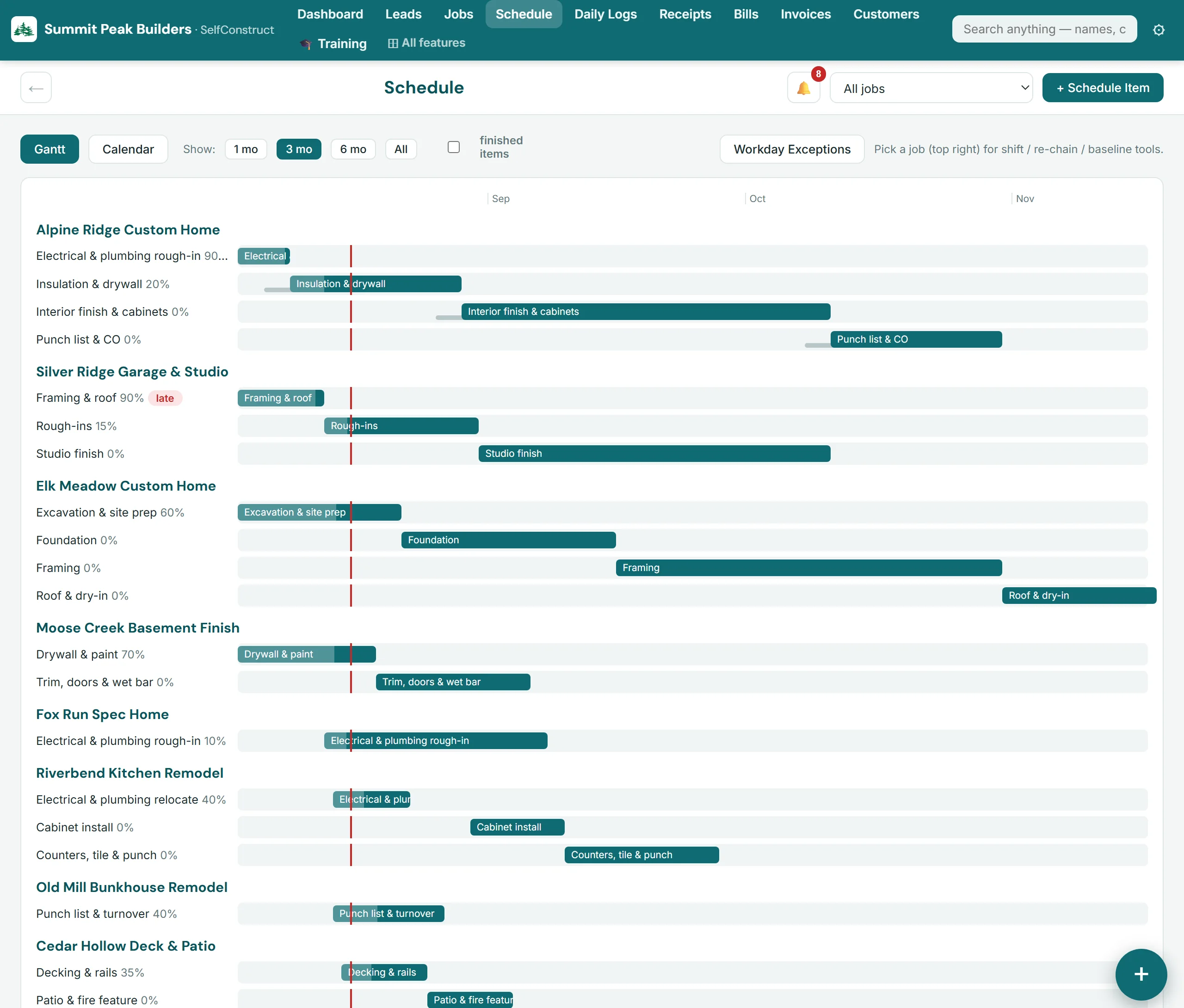
Templates turn planning into minutes
Build your sequence once — excavation through punch list with durations and offsets — and apply it to every new job. Dates shift from the start date automatically, so a schedule that used to take an evening takes a minute.
Everyone sees their lane
Assign phases to your own crew or to subs. The crew app shows your people their week; sub assignments keep trades aware of their windows; the client portal shows homeowners a clean weekly view without the internal noise.
Reality is part of the schedule
Percent-complete per phase, weather days and holidays as first-class exceptions, and daily logs tied to the same timeline — so the schedule reflects the jobsite, not the plan from six weeks ago.
See it in a trade demo: Flooring contractor software, Drywall contractor software, Cabinet and countertop company software, Tile contractor software, Finish carpentry contractor software, Framing contractor software.
Questions builders ask
Can clients see the schedule?
Per-item: you mark what's client-visible. Their portal shows a clean weekly schedule and full phase view of only what you shared.
Does it handle multiple jobs?
Yes — the demo runs ten concurrent jobs. Each job carries its own phase schedule, and the dashboard rolls up what's slipping across all of them.
Can I copy a schedule between jobs?
That's what templates are for: define the sequence once, apply it to any new job, and the dates calculate from the job's start date.
See it working right now
The live demo is a fictional construction company you can click through end to end — including a working client portal — the whole product, running. Pricing is published on the site: $299/mo per company, before sales tax, with unlimited users and 50 GB of storage included.
Opens a short form. Nothing is paid here; a person sets up your company, usually within one business day.
Related
Explore SelfConstruct
Resources
© 2026 SelfConstruct™ · selfconstruct.app · Contact · Security · Privacy · Terms · EN · ES
hello@selfconstruct.app · (720) 919-3396 · SelfConstruct, LLC · PO Box 4158, Granby, CO 80446