Field service dispatch software: one board for the calls and the technicians
For every trade that sends technicians out, in the standard account and set up with you: the calls waiting for a technician, each technician's day as a lane, drag to book or move a visit, and the day's calls on a map.
Dispatch demo: opens the board of Hollowlatch Door Co., a fictional garage-door company, with today's calls. No sign-up.
Start: Opens a short form. Nothing is paid here; a person sets up your company, usually within one business day.
Every service trade: garage doors, HVAC, plumbing, electrical and the other trades that send technicians out get the same standard account, set up with you. Nothing is paid here.
See a dispatcher's day · Software by trade
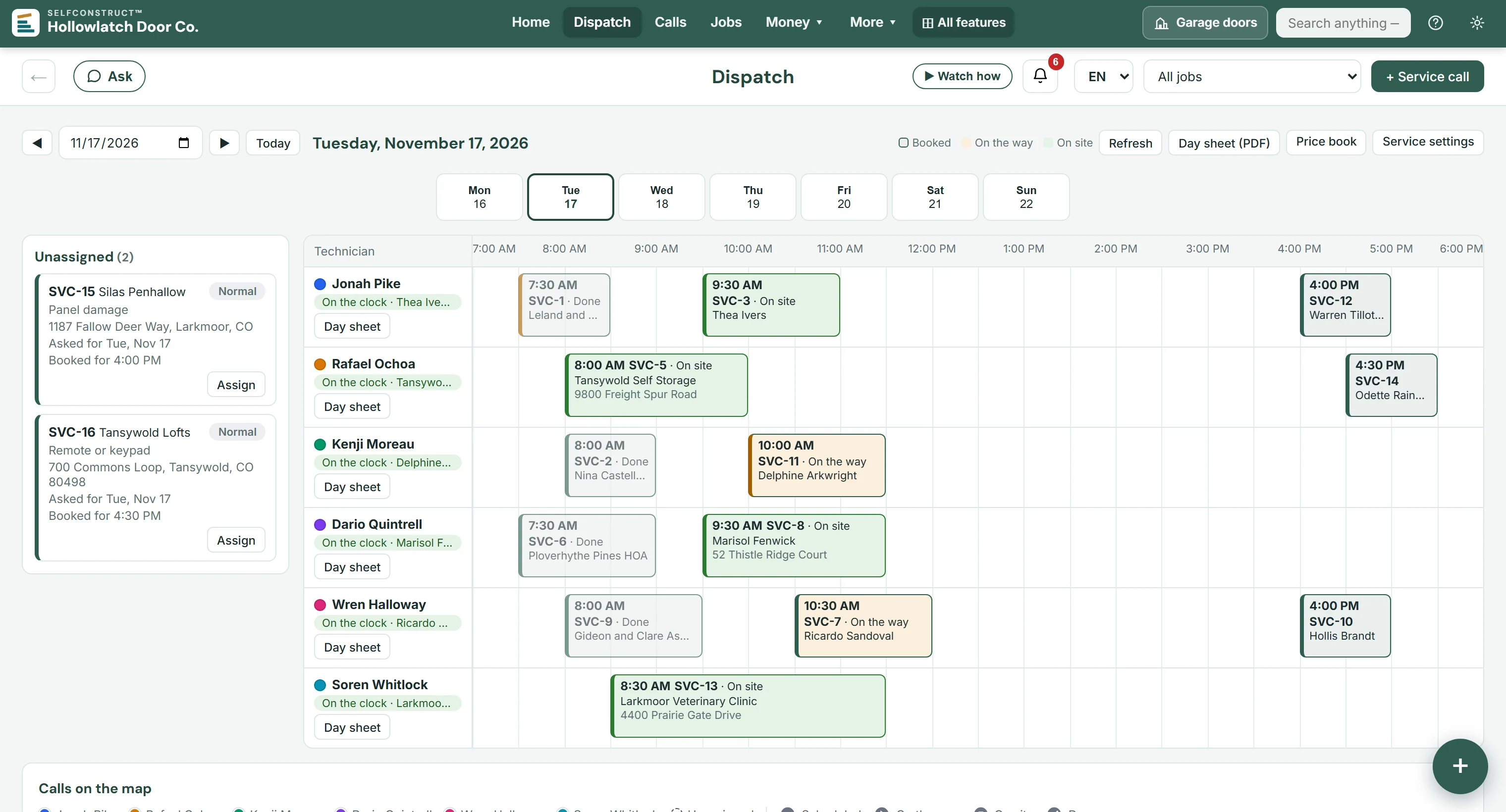
A real screen from the live demo: Hollowlatch Door Co., a fictional garage-door company. The names, people, jobs and prices in it are illustrative. Map data © OpenStreetMap contributors.
The calls waiting, and the day ahead
The dispatch board opens on today. On the left sit the calls waiting for a technician, emergencies first, each with its customer, address, issue, the day asked for and an Assign button. Across the rest of the page, each technician has a lane on a time grid, shaded outside their working hours, and time off shows as a block that says only Off.
A lane for each technician
A visit on a lane shows its time, call number, customer, short address and issue, in its priority's color, and its status as the technician taps through it: on the way, on site, done. Each lane carries the technician's time-clock status, so the office sees who is on the clock and on which job. Lane colors and their order are set in Service settings.
Book or move a visit by dragging it
Drag a waiting call onto a lane, or a booked visit to another technician or another time, with a mouse or a finger on a tablet. The drop snaps to the grid, and before anything is booked the board shows what the move runs into: another visit, hours outside the technician's day, or their time off. Apply books it.
On a phone, the same move as a form
Without a drag - on a phone, with a keyboard, or from the Assign button - a call opens as a form: technician, day, time, duration, arrival window and notes, with the same check of what it runs into before you apply it. A booked visit can be unassigned or cancelled from the same form.
Two dispatchers, one board
The board checks for changes every 25 seconds, and again when you come back to its window, so a second dispatcher's moves appear without a reload. If someone else moved the same visit first, the board tells you and redraws, instead of booking over their change. It never redraws under a card you are dragging.
The day's calls on a map
Under the board, each call of the chosen day is a pin at its property: in its technician's color, white with a dashed edge while it waits for one, and marked scheduled, on the way, on site or done. Tap a pin for the customer, the address, the arrival window and the technician, and open the call from there. The office's Home carries the same map.
What the technicians' taps change
Each technician works from their own phone, where My calls lists today's visits in order. On my way, Arrived, Done and Couldn't finish each change the visit's status on the board and on the map, and On my way can send the customer an email. The office sees the change on its next check, without anyone phoning in.
Where it stands today
For every trade that sends technicians out, the dispatch board is part of the standard account at the published price, set up with you: you start with the short form, and nothing is paid on this site. Service agreements, truck stock and card or bank payments are not available yet. Quotes, jobs, invoices, the payments you record and the built-in books work for every trade today.
Questions service companies ask
How does the office know a technician is on the way?
The technician taps On my way on their phone. On my way, Arrived, Done and Couldn't finish each change the visit's status on the board and on the map, which show the change without a reload, and On my way can send the customer an email.
Can I try it without signing up?
The live demo opens Hollowlatch Door Co., a fictional garage-door company, on its dispatch board, with no sign-up. Any call on the board opens from there.
Can my company start with it today?
Yes, if it sends technicians out: garage doors, HVAC, plumbing, electrical or another service trade. The dispatch board is part of the standard account, at the published price per company, before sales tax. Press Start SelfConstruct: a short form, nothing is paid here, and a person sets up your company with you.
See it working right now
The dispatch demo is Hollowlatch Door Co., a fictional garage-door company: its service calls, its board and map, and its technicians' day, with no sign-up.
Opens a short form. Nothing is paid here; a person sets up your company, usually within one business day.
Related
Explore SelfConstruct
Resources
© 2026 SelfConstruct™ · selfconstruct.app · Contact · Security · Privacy · Terms · EN · ES
hello@selfconstruct.app · (720) 919-3396 · SelfConstruct, LLC · PO Box 4158, Granby, CO 80446