Built by a builder, for builders

Your whole construction company.
One system. Flat pricing.

For home builders, remodelers and specialty trades — framing, drywall, solar, HVAC and more.

The bids, the schedule, the portals, the invoicing and the books that sit behind them — one system for the whole company, on your own private instance.

$299/month per company · Unlimited users · Live demo available now

The demo is the real product running a complete fictional company — no sign-up, nothing to install.
Why SelfConstruct · See pricing — it's public · Book a walkthrough
See how it works
Books balanced
to the cent, automatically
24 reports
P&L to punch list
yourcompany.selfconstruct.app
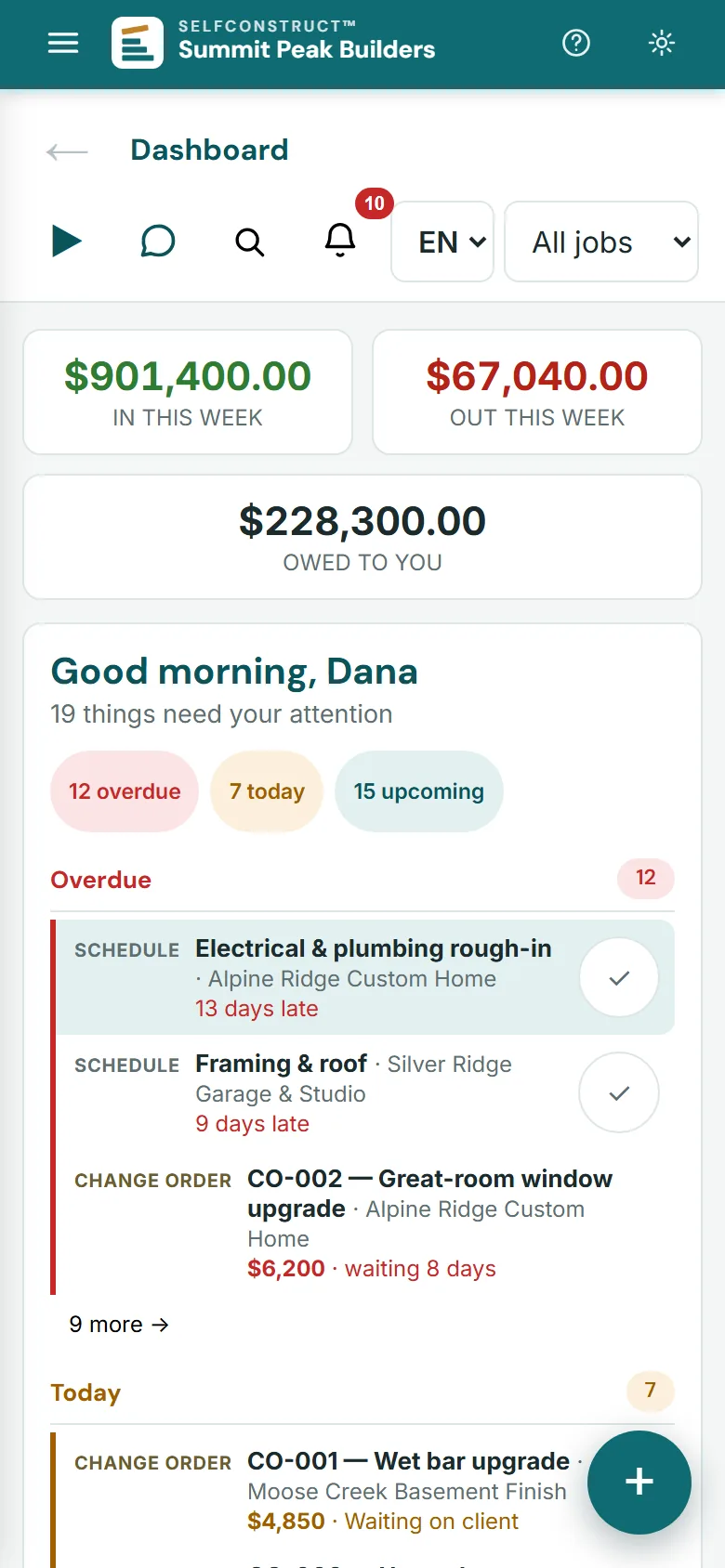
SelfConstruct office dashboard: money in and out this week, what is owed to you, and what needs attention across the jobs — overdue, today and upcoming
Find your trade

See it in your line of work

Pick your trade to read about the demo company closest to your kind of work.

View all 47 tradesShow fewer trades

The names, people, jobs and prices in this demo are illustrative.

Four front doors

Everyone sees exactly what they should

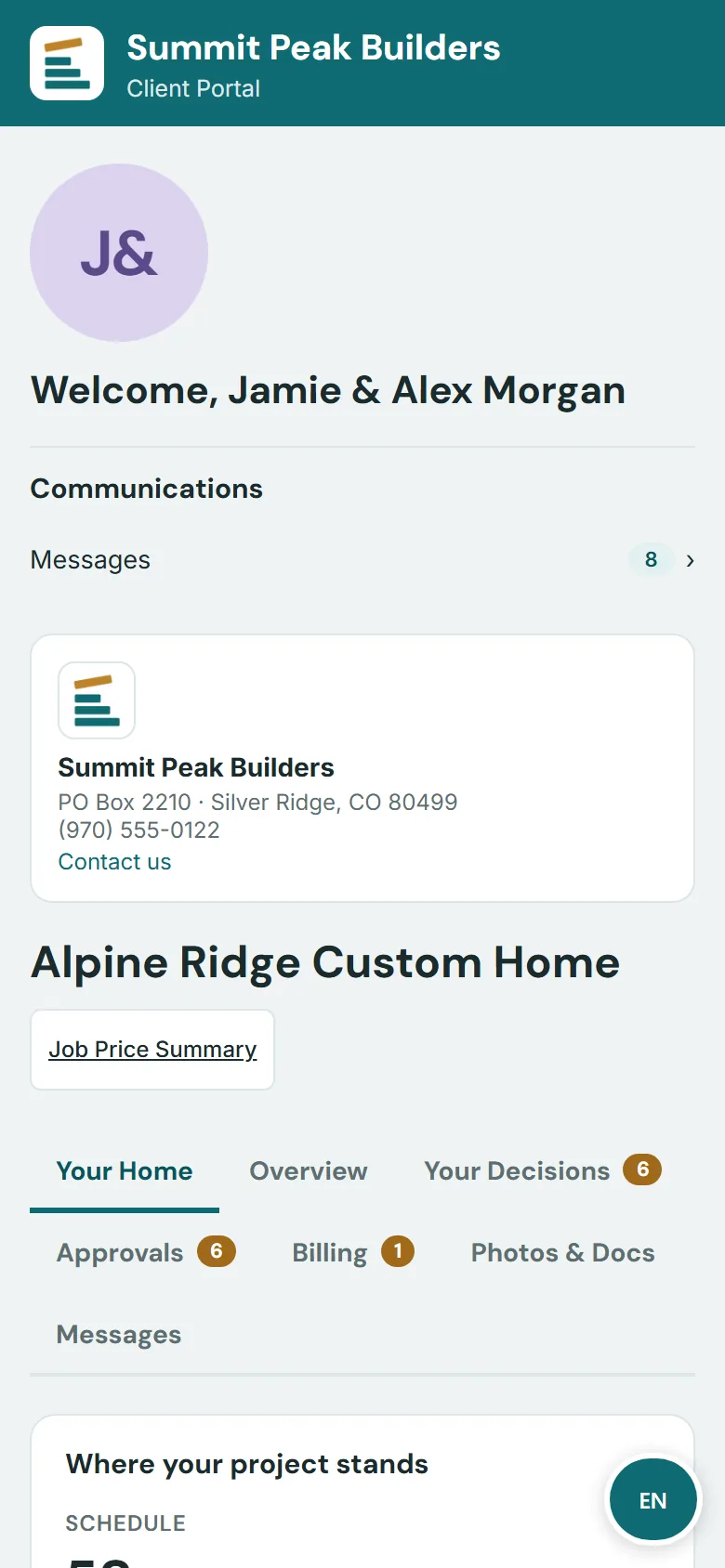
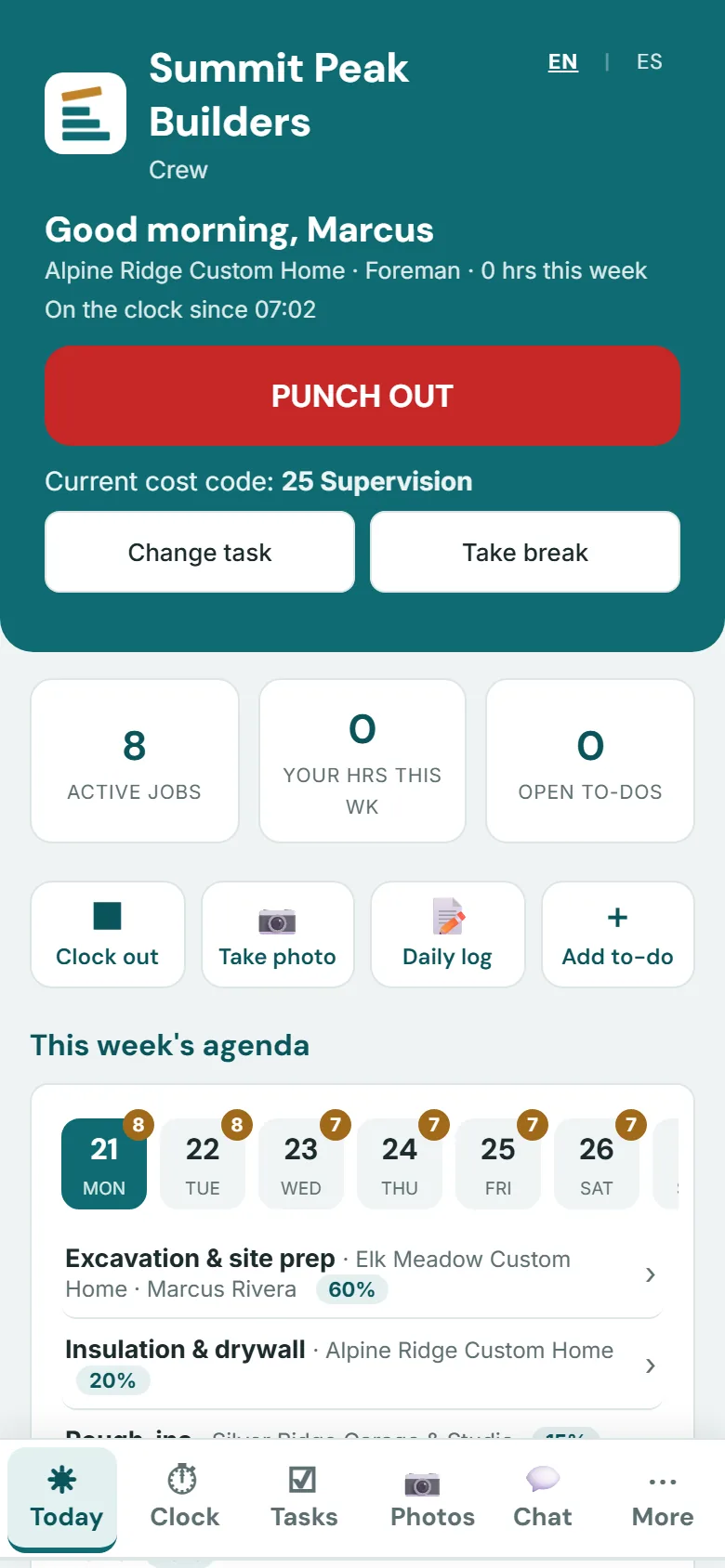
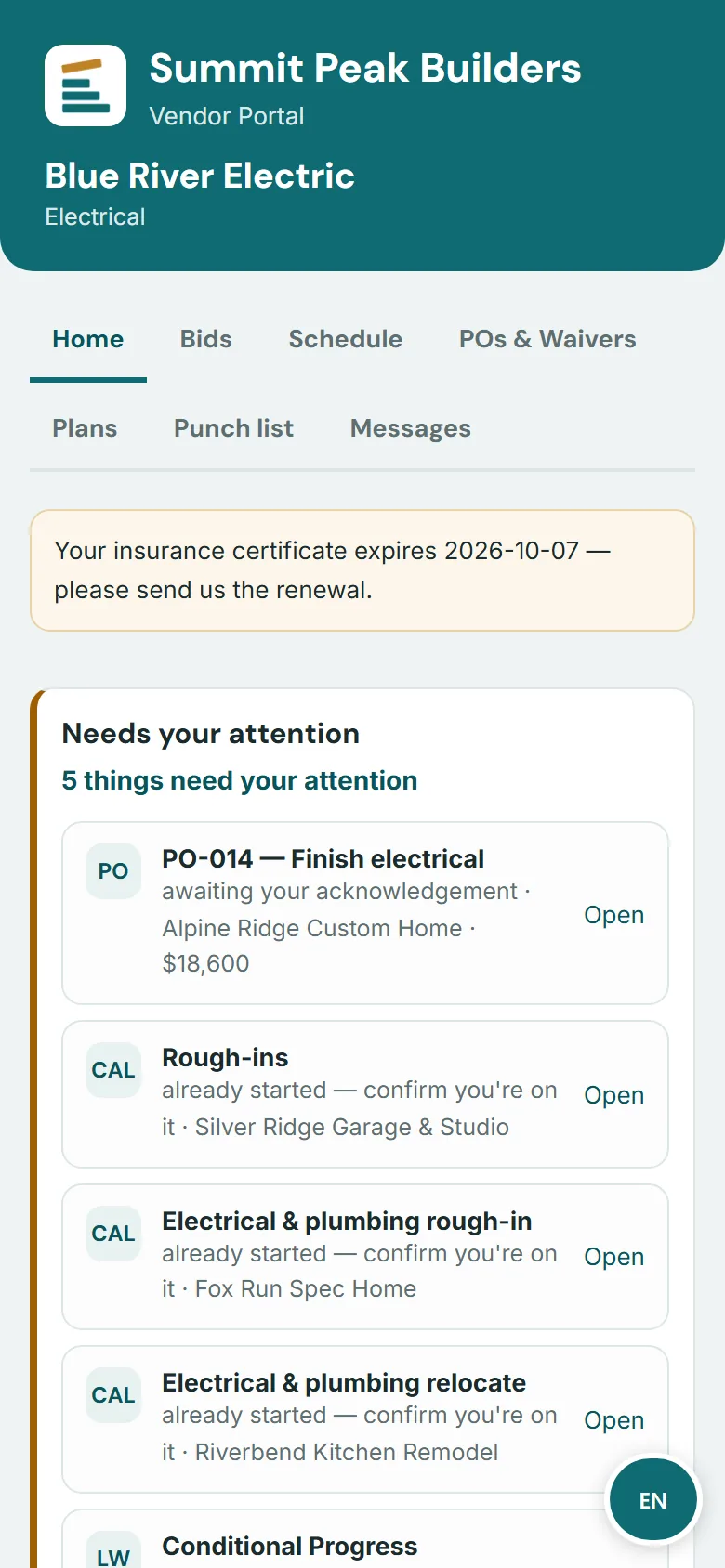
One system, four sign-ins. Clients watch their build. Crews clock in and log work. Subs see their POs and where their payment stands. You see everything.

$299
per company, per month
Unlimited
users included
40+
modules
24
built-in reports
4
portals
100%
your data

English & Spanish: the office and the client, crew and sub portals. Each person picks their language on their own device.

One login replaces project management software accounting software estimating spreadsheets e-signature tools lead-gen services time-clock apps
Why builders move

Three reasons, in plain words

All six differences, each linked to the demo screen that proves it →

The daily work

Everything between the handshake
and the final draw

Most construction software makes you bolt a separate accounting system onto one end and a lead service onto the other. SelfConstruct is the whole office — sales to settlement — so a number entered once flows everywhere it should.

Sales & Bids

Bids that read like you walked the site

A kanban pipeline from first call to signed contract, and a bid builder that sends your client a proposal under your logo, in your colors. They read it on their phone, tick the options they want and sign it online. The cost and margin behind every section stay with you.

  • Leads pipeline with follow-up nudges, lead map & email campaigns
  • Cost, markup and margin on every section, kept in the office and never on the client's page
  • Client signs online; press Create Project and the signed bid becomes the job, its budget, schedule of values and deposit invoice

Every bid can carry

  • Priced scope sections
  • Allowances
  • Alternates the client can tick
  • Phase schedule
  • Inclusions & exclusions
  • Terms
  • Deposit at signing
  • Online signature
Opens in your logo & colorsThe top of a proposal from Quillback Ridge Builders, a fictional builder, as its client opens it: the builder's logo in a white box on a band of the builder's plum, the title Antler Bench custom home - 4,200 sf, prepared for Marguerite Vail at Lot 9, Antler Bench, and the proposal number and dates. On a wide screen it also links to each section of the proposal; on a phone a bar at the bottom holds the $1,318,100 contract price and a Review & sign button.

Your logo leads, on a band of your color. SelfConstruct appears only as a small credit at the foot of the page.

Shown: Quillback Ridge Builders, a fictional builder made up for these pictures.

They tick an option, the total updatesThe Alternates section of the same proposal: a heated driveway and front walk at $24,800 included in the contract price, a 12 kW rooftop solar array ticked to add $41,500, a covered rear deck at $36,200 left unticked, and the total moving from a $1,276,600 base contract to $1,318,100

Each alternate shows its price. Ticking one re-prices the contract on the page (here $1,276,600 becomes $1,318,100), and the choice is recorded when they sign.

Signed online, in their own handThe same proposal after signing: Accepted, signed by Marguerite Vail with the date and time, her drawn signature, and a line saying a copy of the signed proposal stays available at the link

Consent, a one-time code, a typed name and a drawn signature. The signed version is locked as the contract.

In your office

Your numbers stay in the office, and the signed bid becomes the job

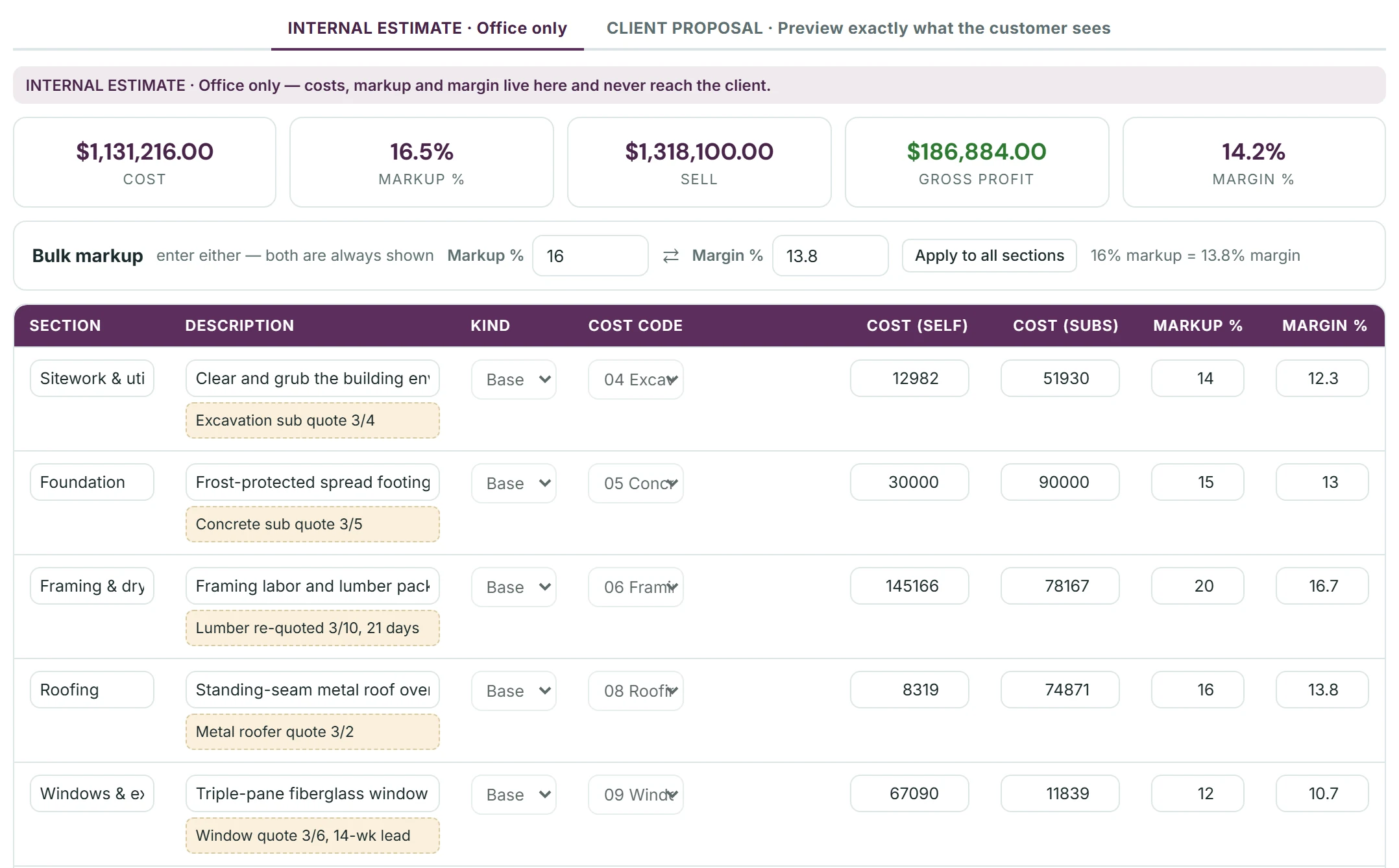
Cost, markup & margin — office only
The same bid's internal estimate in the bid builder, marked office only: costs, markup and margin live here and never reach the client. The totals: cost $1,131,216.00, markup 16.5%, sell $1,318,100.00, gross profit $186,884.00 and margin 14.2%, and a bulk markup box where 16% markup is 13.8% margin. On a wide screen, the first five sections - sitework and utilities, foundation, framing and dry-in, roofing, windows and exterior doors - each with its description, its internal note, its kind, cost code, own cost and subcontract cost, and its own markup and margin.

The numbers stay in the office. Under the bid's totals, every section carries its cost code, its own and subcontract cost, and its own markup and margin.The whole bid's cost, markup, sell, gross profit and margin, and a bulk markup you can enter as either markup or margin. The sections become the job's budget, with the original estimate pinned to track against actual. Your costs, markup and margin never reach the client.

Create Project builds the jobIn the SelfConstruct office, the same bid after signing: Proposal Accepted, a $1,318,100 contract signed by Marguerite Vail, v1 is the contract and immutable, and Create Project from Accepted Proposal, listing what it will make: the customer and the project, the contract amount, the original estimate pinned at cost $1,131,216, gross profit $186,884 and margin 14.2%, a job budget and schedule of values of 16 cost-coded lines, the three allowances as selections, the selected alternates, 3 files from the lead and a $131,810 deposit invoice visible in the client portal. On a wide screen it also shows the Custom Home full-sequence job template picked, beside the Create Project button.

Locked as the contract. The signed v1 can't be edited; a change becomes a new version, or a change order once the job exists. Create Project opens the job with its budget and schedule of values of 16 cost-coded lines, the client's selections, the lead's files and the deposit invoice.

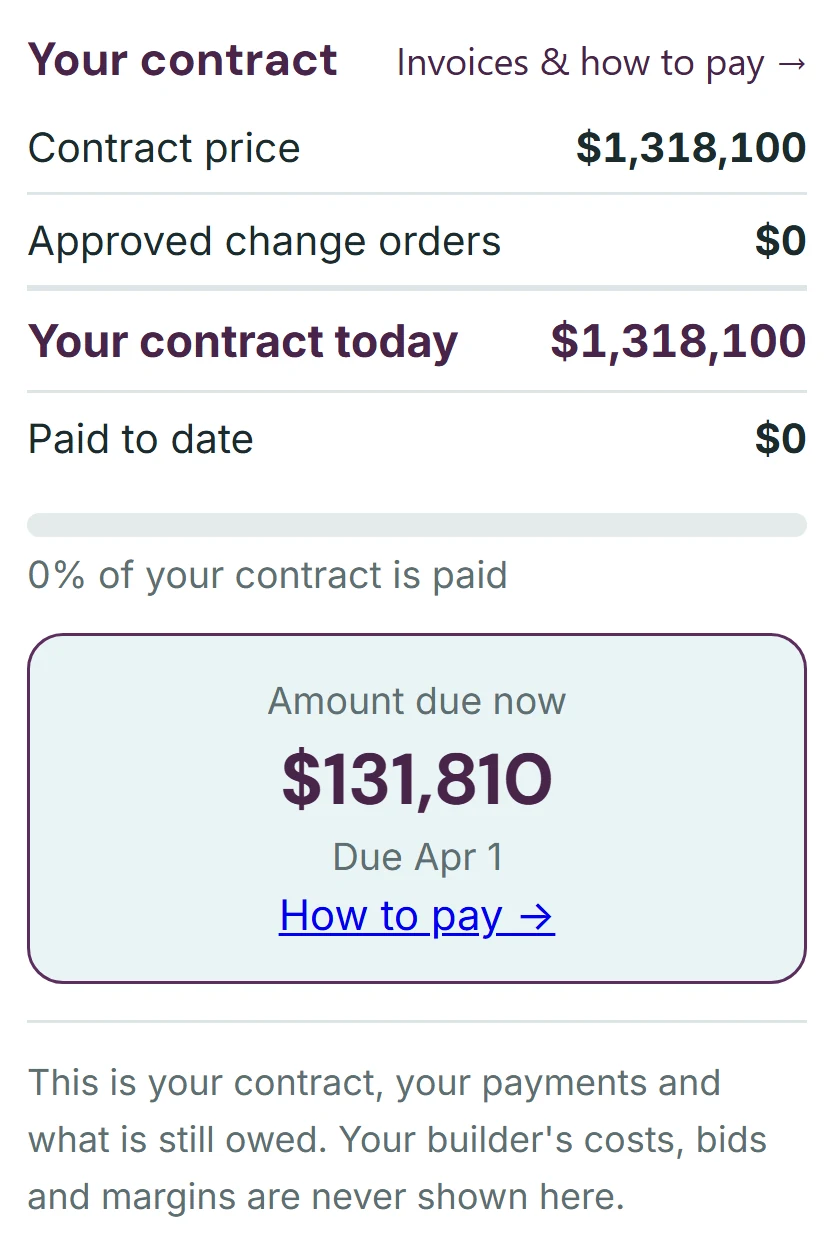
The deposit, already in their portalThe contract card in the client's portal for the same job: contract price $1,318,100, no approved change orders, nothing paid yet, $131,810 due now with its due date and a How to pay link, and a line saying the builder's costs, bids and margins are never shown there

In their portal, in your color. The contract card already shows the $131,810 deposit due now, with how to pay it, and tells the client that your costs, bids and margins are never shown there.

Project Management

Schedules that survive contact with reality

Gantt and calendar views with dependencies, baselines, and client-visible milestones. Daily logs, to-dos, change orders, selections, RFIs, submittals, warranty — every moving part of the build, tracked where the crew already is.

  • Drag a bar, and dependent work re-chains — with the original baseline kept honest
  • Daily logs & photos from the field, shareable to the client in one tap
  • Change orders priced, sent, signed and folded into the contract total
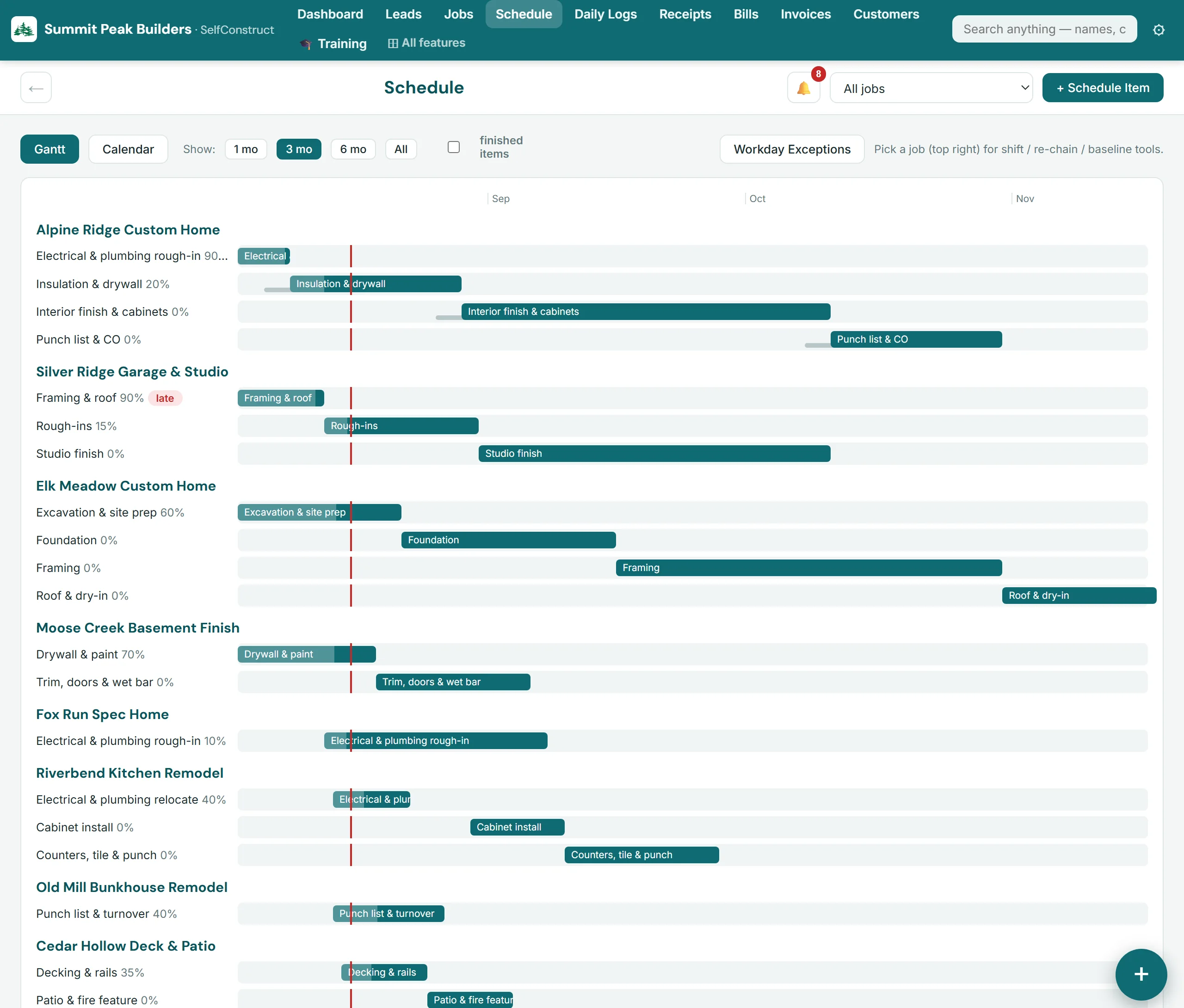
Gantt scheduleSelfConstruct Gantt schedule over three months: phase bars for four jobs and the start of a fifth, with percent complete and late phases flagged
Money — all of it

From takeoff to trial balance, no exports

Estimates, budgets, POs, vendor bills, draw invoices against a schedule of values, lien waivers — landing in a full double-entry general ledger with banking import, reconciliation, and financial statements in the formats accountants work from.

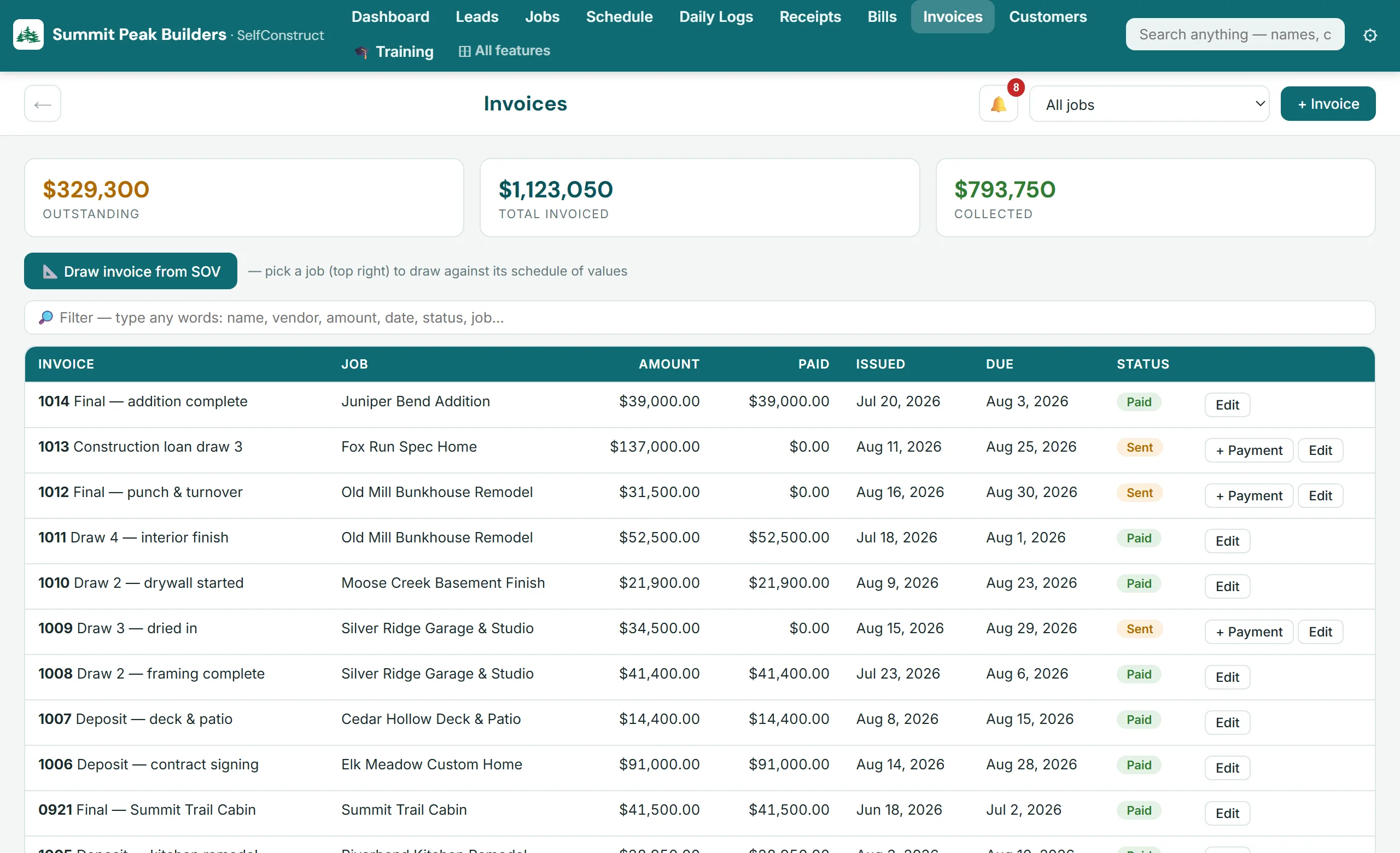
  • Draw invoices generated straight from the SOV — payments tracked to the cent
  • Snap a receipt; AI reads it and codes it to the job — you check it, then post the bill
  • P&L, balance sheet, cash flow, WIP, job costing — 24 reports built in
Draw invoicingSelfConstruct invoices — outstanding, invoiced and collected totals with draw history
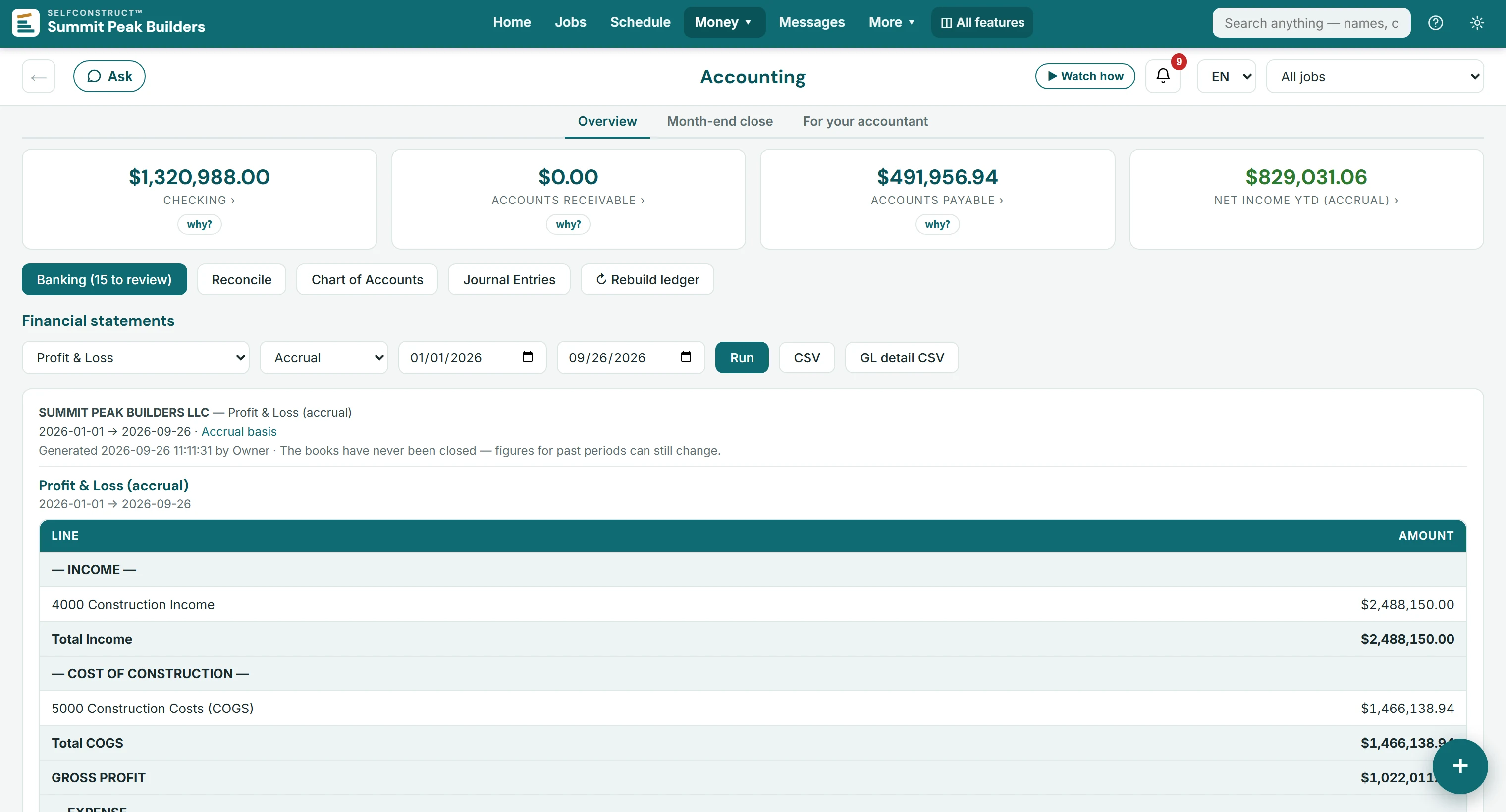
Accounting, built in

JobFi — full construction accounting, built into SelfConstruct

This is the part most software leaves out: SelfConstruct is the accounting system. Every invoice, bill, and payment posts itself to a real chart of accounts. No sync jobs and nothing entered twice. Payroll runs and tax filings stay with your payroll provider, and an independent construction-CPA review is planned, not finished — the accountants' page spells out both.

  • Double-entry GL with a builder's chart of accounts out of the box
  • Bank import with AI categorization & month-end reconciliation
  • Accountant package at tax time — statements, trial balance, 1099 report
JobFi — general ledgerJobFi, SelfConstruct's built-in accounting: balance cards for checking, receivables, payables and net income; banking, reconciliation, chart of accounts and journal entries; and a Profit and Loss statement run from the ledger
Standards we hold ourselves to
🔒
Private instanceYour own database, never shared
🛡️
Sealed backupsEncrypted offsite; decryption keys stay offline, never on your server
📱
Two-step sign-inAvailable on every office login
📦
Your data stays yoursFull company export — database, files and CSVs — any time
💵
Published price per companyNo per-seat fees, no surprises
🌐
English & SpanishThe office and the client, crew and sub portals
The AI office

Paperwork in, decisions out

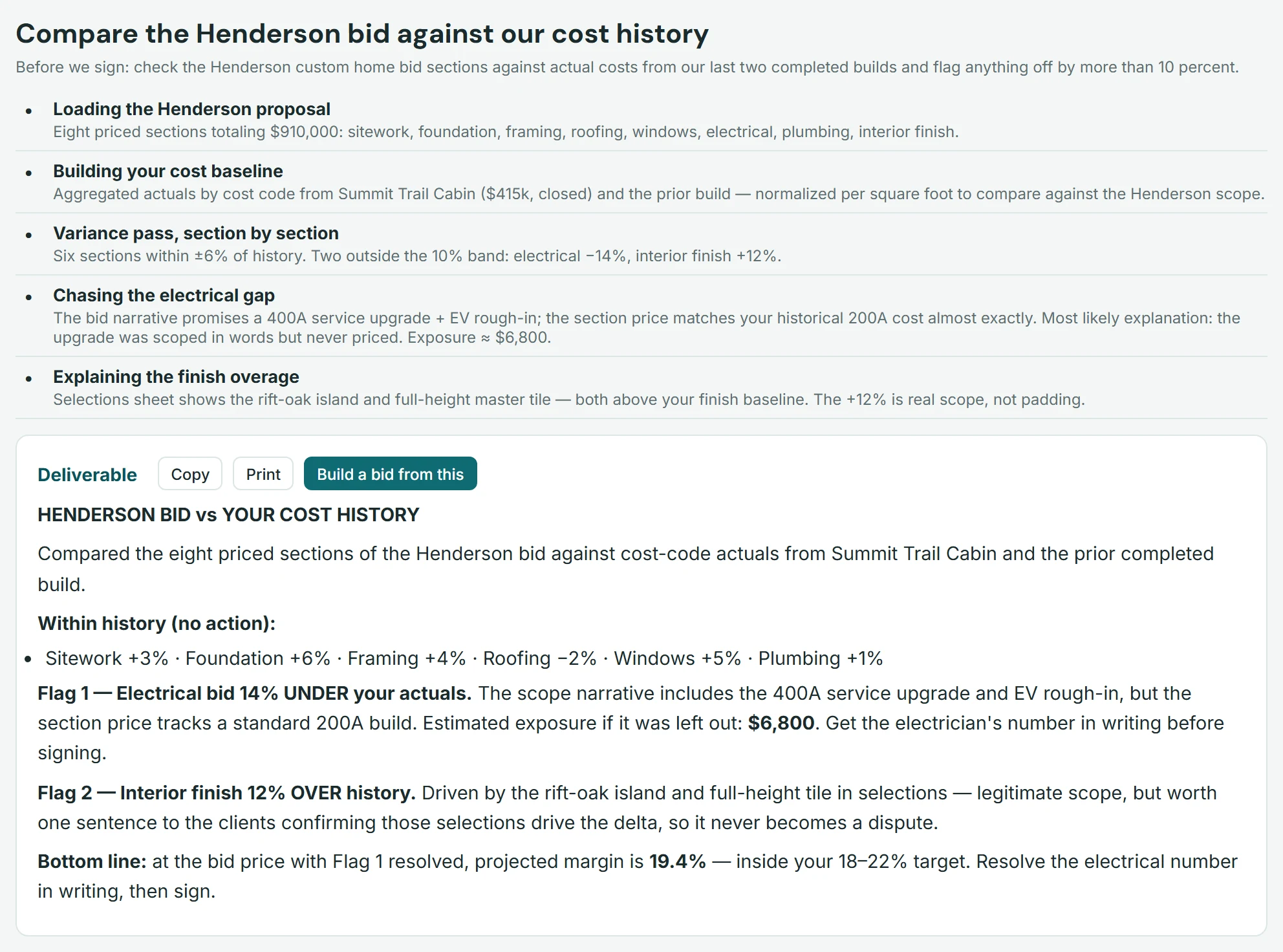
Hand it a plan set, a county letter, or a bid — it reads your documents, checks your own cost history, and hands back a finished deliverable. Not a chatbot bolted on: an office assistant wired into your jobs, bids, and books.

It caught $6,800 before the signature

In the demo company, the AI compared a $910,000 bid against the builder's own cost history and flagged an electrical section priced for a 200A build — while the scope promised a 400A upgrade. That's the kind of miss that eats a margin.

  • Draft a sectioned, priced bid straight from an uploaded plan set
  • Answer plan-review letters with the code sections cited for you to verify
  • Web-grounded research with sources — snow loads, market $/sf, code questions
  • Receipt reader codes field purchases to the right job & cost code, ready for you to post
Metered honestly. Every task is metered at its true token cost — a bid check like this one runs about $0.18. A $25/month allowance is included — at that rate, well over a hundred bid checks a month.
AI Workspace — real taskSelfConstruct AI Workspace comparing a bid against cost history and flagging a $6,800 gap
Pricing

One price per company. Every module included. Unlimited users.

No per-seat math, no "percent of construction volume," no tiers to decode. $299 a month per company runs the whole system for everyone in it.

Need more in a busy month? Optional add-ons — AI credit packs from $19, extra onboarding help — set up with you on your walkthrough. None of it is required.

One plan, month to month by default — or pay annually and get 2 months free. Annual is a choice, never a requirement; no onboarding fee, no per-seat surprises.
The price on this page is for one company, and it does not change when you add people. It includes 50 GB of files and records; beyond that, storage is $10 per extra 10 GB a month. Each additional company you run is another $299 a month, on its own private instance with its own books. Prices are in US dollars, before any sales tax that applies.

Questions

Asked and answered

How long does setup take?
About a day. We provision your private instance and put your logo on it; the in-app Setup Center then takes you through your company details, your books and your team yourself — nothing you have to wait on us for. A live walkthrough for your team is there if you want one. The in-app Training Academy — short narrated walkthroughs on demo data — handles every new hire after that.
I already have years of data somewhere else — what comes across?
Your customer list, vendors, jobs, leads, schedule items, to-dos, open invoices, purchase orders and unpaid bills import from Excel or CSV files you export yourself, and your opening balances are set on a cutover date you pick. Your general ledger history stays in your old books; documents, photos, estimates and time history start here. Nothing is written until you approve the preview, and a reconciliation report afterwards sets the two systems side by side line by line. The page on moving over says exactly what does and does not come across.
Do I still need separate accounting software?
Not for the books. SelfConstruct includes a full double-entry general ledger: chart of accounts, bank import, reconciliation, P&L, balance sheet, cash flow, trial balance, and an accountant package for tax time. Your CPA gets real financial statements backed by a double-entry ledger — plus clean exports when they need them. It does not run payroll and does not file sales or use tax, and it has not yet been reviewed by an independent construction CPA. The accountants' page states the limits in full.
Is SelfConstruct in Spanish?
Yes. The office and the client, crew and sub portals are in English and Spanish, and each person picks their language on their own device, so a crew lead can clock in in Spanish while the office works in English. This website has a Spanish version too.
Is it really unlimited users?
Yes. Office logins, crew codes, sub codes, and client portals are all included in the one price, $299 a month per company. We price per company because that's how a construction company actually works — the last thing you need is a toll booth on adding your framer. What the plan limits is storage, not people: 50 GB of files and records per company is included, and beyond that it is $10 a month for each extra 10 GB.
Who can see my data?
Your company runs in its own isolated instance with its own database — there is no shared multi-tenant store. Your clients see only their job through their portal code; crews and subs see only what you grant. Offsite backups are sealed with public-key encryption, and two-step sign-in (two-factor authentication) is available on office logins. The full plain-language rundown is on our security page.
What happens if I cancel?
You get your complete database and uploaded files handed to you, and we delete the instance. Month to month, no annual contract, no exit fee. Your history is yours.
Is there a mobile app?
SelfConstruct installs to any phone's home screen like an app — the office, crew, client and sub portals all work full-screen on iOS and Android. The office and crew apps can send push notifications; clients and subs get email. Nothing to download from an app store, nothing to update.
What does the AI actually cost me?
Your plan includes $25/month of AI usage metered at true provider cost — no markup games inside the allowance. A typical bid-vs-cost-history check runs about $0.18; a drafted county-letter reply, around a dollar. Heavy months can add credit packs — spent after the allowance, good through the end of that month.

Click around a fully built company,
right now

The demo is a complete fictional builder — jobs mid-build, a live schedule, invoices, books that balance to the cent and finished AI tasks. No trial clock. It's view-only, so click fearlessly — you can't break anything.

Try the live demo → Start SelfConstruct

Opens a short form. Nothing is paid here; a person sets up your company, usually within one business day.

Rather be shown around? Book a walkthrough

Book a walkthrough

Tell us where to reach you — we'll set up a 30-minute walkthrough, usually within one business day. No pressure, no contract talk unless you want it.

We only use this to reach you about your walkthrough.
Try the live demo → Start